10-day free trial

Thursday, May 11, 2006

The PinoyMacLovers iLove iPod Project Entry#2

George Gershwin's song goes:

Summertime,
And the livin' is easy
Fish are jumpin'
And the cotton is high


I don't think we grow a lot of cotton here in the Philippines but we do have a lot of great beaches. And since it's summer, it's definitely the best time to go to one. Just think of the sun, the sand, the laid-back atmosphere, a refreshing drink and some great music. Pretty nice picture, eh?

Speaking of pictures, PinoyMacLovers reader, Nic, has sent us some easy summertime livin' photos of him enjoying the beach bum life (if only for a few well-deserved vacation days). With his 4th Gen 40GB iPod and portable JBL On Tour speakers, he set out for a few days of relaxation at the beautiful Montemar Beach Resort in the Philippine province of Bataan.


Hope you're all enjoying your summer break! :)

Also check out:
PinoyMacLovers iLove iPod Project Entry#3
PinoyMacLovers iLove iPod Project Entry#1

Disclaimer: The PinoyMacLovers iLove iPod Project is an independent project and has not been authorized, sponsored, or otherwise approved by Apple Computer, Inc. The use of any of the images featured in this project, in whatever manner and for whatever purpose, is prohibited without express and written authorization from the author.

Wednesday, May 10, 2006

Apple Wins In "Apple vs Apple" Legal Battle (Apple Computer, that is...)

The Apple Corps record label (co-owned by The Beatles) loses legal battle with Apple Computer over the latter's use of its own logo in the iTunes Music Store.

I personally think that this lawsuit is ridiculous. I've never even heard of Apple Corps (which was established, like, 327.4 YEARS AGO!) until this whole legal dispute came about, and I have no idea how their logo even looks like. And the people who do (who might therefore confuse the two trademarks) are either dead or will die soon. And I hear that Apple Corps will be filing an appeal. Please... I think it's time for them to let go. But then again, maybe The Beatles will finally be selling their music on iTunes and this is all just one big conspiracy so that they can get publicity. Ooohhh... I like that theory. It's just as ridiculous as the lawsuit.

read more | digg story

Tuesday, May 09, 2006

Microwarehouse Philippines "Mac Of My Life" Exhibit Successfully Held

I was able to check out the "Mac Of My Life" exhibit, which was organized by Microwarehouse Philippines, last Sunday (the event was held on May 6 & 7 at the Power Plant mall in Rockwell). It was pretty well-attended. I got to see alot of great photographs, and was able to play around with some of the Macs they had on display for the event. They showcased a couple of Apple Cinema Displays at the exhibit, too. All I can say is, "I want one!" The event organizers and their partners also held a few seminars during the event, for those who were interested to learn about Macs. When I got there, the speaker was talking about the Mac OS X browser, Safari.

The "Mac Of My Life" exhibit served as the culminating event for the "Apple Of My i" photo contest - a competition that featured various photographs of people with their favorite Apple products. The contest was divided into two categories: Public i (for photo entries featuring celebrity subjects) and Private i (for photographs featuring mere mortals like you and I). Some of you may be interested to know who won the Public i category, so I thought I would list the winners for you:

3rd Place
"iPod Fun"
Photographer: Dr. Siegfried R. S. Perez
Subject: Lani Pillinger

I have absolutely no idea who Lani Pillinger is, but judging from how well her bikini fit her in the photograph, I'd say she's a model. Oh, and she was holding an iPod, too.

2nd Place
"iRomance"
Photographer: Samuel de Leon
Subjects: Onin Miranda and Arlene dela Cruz

Again, I have no idea who these two are. But apparently, they're broadcast journalists (it said so on the label right beside their portrait). The picture featured a PowerBook with the girl's photograph as its wallpaper, and an eMac that had the guy's picture. The two Macs were placed side by side, and it looked as if both desktop wallpapers were staring at each other. Based on the photograph and its title, I assume that both subjects are romantically involved.

1st Place
"By Darklight, I Write"
Photographer: Wawi Navarroza
Subject: Lourd de Veyra

This one was a rather dramatic black & white photograph that featured the subject typing away on his iBook within the confines of a small enclosure by the foot of a staircase, its singular source of light - a large and lonely window (pause for dramatic effect). Now, I also didn't know who Lourd de Veyra was, but a quick google search will tell you that he is the vocalist for the band "The Radioactive Sago Project". And since I don't live under a rock, I, of course, have heard of them (just don't ask me what the title of their songs are).

Oh, and I must tell you that I had a wonderful celebrity sighting during the event. While I was playing around with one of the PowerMacs on display, right beside me was the vivacious host of ETC's Rated OH! - Sam Oh! Oh, wow! And she was oh so gracious enough to let me take an oh so lovely picture of her to put on my oh so lovely blog (ok, I'll stop with the OHs now). Thanks, Sam! I hope you get that iPod Nano soon (she told me she was thinking of getting one)! :)


They raffled off two iPod Nanos during the event (one for each day), both of which were actually won BY THE SAME PERSON! I suspect that said winner kept a horseshoe, a rabbit's foot and a four-leaf clover tucked under her armpits.

Friday, May 05, 2006

Hot Summer Deals From Ynzal
Macs & iPods At HUGE Discounts

Ynzal Marketing Corp. Philippines is having a promo entitled Hot Summer Deals. Huge discounts are available on selected Apple products. Here's a short list:

iBook 12" G4/1.33GHz/512MB/40GB/Combo/APX/BT M9846.....P61,980
*Comes with FREE Airborne Wi-Fi access
Promo Price.....P53,980 Only!

PowerBook 12" G4/1.5GHz 512/80GB/SuperDrive/APX/BT M9691.....P93,980
*Comes with FREE Airborne Wi-Fi access
Promo Price.....P87,980 Only!

iPod 60GB Black/White.....P24,500
Promo Price.....P20,500 Only!
Educational Discount Price.....P19,980 Only!

iPod nano 2GB White/Black.....P11,500
Promo Price.....P10,500 Only!
Educational Discount Price.....P9,980 Only!

iPod nano 4GB White/Black.....P14,500
Promo Price.....P12,500 Only!
Educational Discount Price.....P11,980 Only!

Students and teachers are required to present a valid school ID in order to avail of the educational discount. Promo is valid until 31 May 2006 or until supplies last. For more information regarding this promotion and the other products on sale, you may contact Ynzal Marketing Corp. Philippines at 413-7575/74 or 413-7579/78.

Stefan Succeeds!
College Student Is Able To Buy A Mac From Internet Donations

In just less than a month after setting up his blog, Stefan Constantinescu was actually able to raise the needed funds to buy himself a brand new 20" iMac 2GHz Intel Core Duo, all from the donations of complete strangers. I must say, this guy is really fortunate. He marketed his blog pretty well, and was certainly able to get the word out to a large number of people. I think it definitely helped that his blog turned out to be a bit controversial, and was able to elicit a lot of strong reactions from different people (some people rooted for him, while others criticized him for his "virtual" panhandling). It even had a bit of drama, and one big surprise (like a reality TV show twist) - someone actually gave him a single donation amounting to $1,195 USD! Can you believe that?! What a strange place this internet is, eh?

Wednesday, May 03, 2006

Apple Launches "Get A Mac" Campaign


Potential switchers out there might want to check out Apple's new "Get A Mac" campaign at apple.com/getamac. The page outlines a couple of reasons why you'll love Macs. Apple also sheds some light on a few of the common misconceptions people have about Macs such as the "it doesn't run Microsoft Office" myth. You can also check out the TV ads at apple.com/getamac/ads.

Saturday, April 29, 2006

The Mac Of My Life Exhibit Schedule Of Activities

The Mac Of My Life Exhibit - the culminating event of Microwarehouse Philippines' Apple Of My i photo contest - will be held this coming 6-7 May 2006 at the North Court, Power Plant Mall, Makati City. The top 100 photo entries will be on display for public viewing. There will also be Apple computer demo units set up during the event for those who would like to try out the latest Mac models. They will also be having some talks on such topics like "iPod Tips and Tricks", "iMovie Magic" and much more, to be given by some of the country's local Apple experts and enthusiasts. The photo contest awarding ceremonies will be on Sunday, May 7, at 7pm. You may also get the chance to win an iPod when you come to the event, so be sure to come and check it out!

click to enlarge:
Thanks to PinoyMacLovers reader, Donna, for sending this info our way. :)

Friday, April 28, 2006

PinoyMacLovers Is Having Issues

[UPDATE 7:45PM]
Everything seems to be running ok now. Yey! :)

*****

I seem to be having some website issues right now. The homepage doesn't load completely (it only gets to about 10% - maybe even less). But all the other pages seem to be working fine so you can still read all the recent articles by going to the April 2006 Archives (there's a drop-down menu link located at the site's top navigation bar). I just contacted Blogger Help to tell them about my current problem. Hopefully this will get fixed soon. My sincerest apologies goes out to the ONE person who actually reads my blog (Hi, Mom!).

Thursday, April 27, 2006

College Student Wants To Make The Switch To Mac, Asks People For Donations

Stefan Constantinescu (not sure if that's his real last name) is a college student who wants to make the switch to a Mac. But like many college students from all over the world, Stefan does not have the needed funds to succeed in this endeavor. So he put up a "help me become a switcher" blog asking people to donate so that he could get a 20-inch Intel iMac and eventually free himself from his Pentium II 500MHz ThinkPad (wow, I had one of those BACK IN THE LATE 90s!). It didn't take too long before he got his first donation, and after only 15 days, he has succesfully been able to break the $1000 mark (he needs about $2,400)! I was mildly jealous at first, but then I remembered that the 2 Macs that I have, I received through donations as well (albeit, all the money came from one person - my generous father). But as succesful as his project may seem, not everyone likes what he is doing. He's definitely made himself a few haters (ah, yes, the Internet is full of those). Even the widely popular Cult of Mac blog has posted an article urging people not to help him. So perhaps you could just visit Stefan's blog and see for yourself whether his cause is worthy of your dollar. Aside from his pleas for donations, he also uploads a few video updates as well as other articles related to his endeavor. Now if you'll excuse me, I'll just go put up my "help me buy my own private island" blog project.

Wednesday, April 26, 2006

Friday, April 21, 2006

Ynzal Philippines April 2006 Catalog
Clearance Sale

I just recieved the April 2006 catalog from Ynzal Marketing Corp. Philippines. Here are a few items that or on sale (these are brand new and factory-fresh Macs, Mac accessories and iPods at discount prices):

Accessories/Peripherals:
Apple iSight.....P6,500
iPod Photo 60GB...P16,995
Altec Lansing ATP 3 Speakers.....P2,980
InMotion Mini Speakers....P5,500
InMotion Speakers....P5,500
InMotion IM3 Speakers....P6,500

Hardware:
Mac mini G4/1.42GHz/256MB/80GB/Combo Drive/BT/56k.....P29,980
Mac mini G4/1.25GHz/512MB/40GB/Combo Drive/APX/BT.....P30,980
Mac mini G4/1.42GHz/512MB/80GB/Combo Drive/APX/BT.....P35,980
Mac mini G4/1.42GHz/512MB/80GB/SuperDrive/APX/BT.....P40,980

PowerBook G4 15.2"/1.3GHZ/256MB/60GB/Combo Drive/APX/BT (w/ FREE iSight)...P74,980
PowerBook G4 15.2"/1.5GHZ/512MB/80GB/Combo Drive/APX/BT (w/ FREE iSight)...P96,980
PowerBook G4 17"/1.67GHZ/512MB/100GB/SuperDrive/APX/BT (w/ FREE iSight)...P129,980


*Combo Drive - DVD player & CD player/burner
*SuperDrive - DVD player/burner & CD player/burner
*56k - 56kbps telephone modem
*APX - AirPort Extreme (Wi-Fi 802.11g) for wireless internet
*BT - BlueTooth


For more details, you may contact Ynzal Marketing Corp. Philippines at 413-7575/74 • 413-7579/78 or email them at sales@ynzal.com.

Saturday, April 15, 2006

5 Questions From A New Mac Switcher

A friend of mine recently made the switch to a Mac thanks to the new company he works for that gave him one. Being the Mac enthusiast that I am, I was of course pretty happy for him and told him to feel free to ask if he had any questions. And when I got the chance to talk with him about his new Mac experience, I realized that a lot of the initial questions he had were very similar to the basic things I also asked about when I got my first Mac. So I picked five of his questions and put them together in this little piece I call "5 Questions from a New Mac Switcher" (I know... how creative...):

1. What is the equivalent of Windows Explorer in Mac OS X?

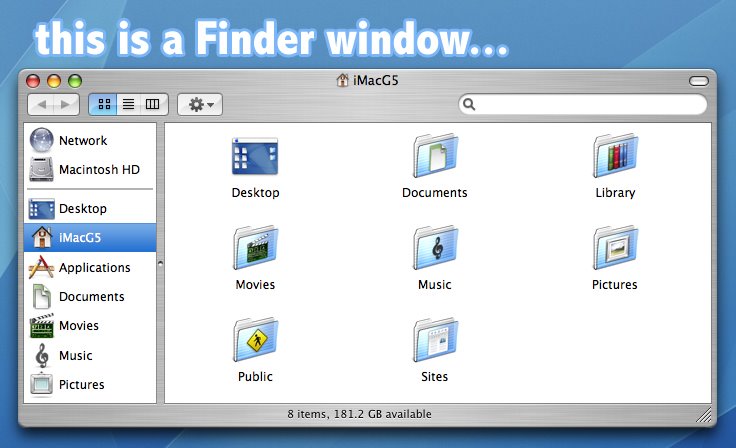
That would be the Finder. But the Finder is so much better.
You can access the Finder by going to the Dock and clicking on the icon with the two faces that share one mouth. That is your Finder icon.

Also, when you open any folder or double-click on the Macintosh HD icon on your desktop, it opens up in a Finder window. The Finder allows you to manage your files similar to Windows Explorer or most other file managers for that matter. You can move some files around, create new folders to organize your stuff, etc... But one of the reasons why I think Finder is so much better than Windows Explorer is because of Spotlight. Spotlight is a handy search tool in OS X that is accessible from any Finder window via a basic search box located at the upper-right hand corner of your window (you can also access Spotlight by clicking on the magnifying glass icon located at the upper-right hand corner of your screen).
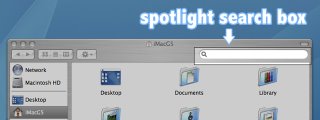
If you're looking for a file, just type the filename in the Spotlight search box. The moment you type in the first character, the search begins and narrows the results down as you type in more characters. You'll see the results displayed immediately in your Finder window grouped together based on file type.
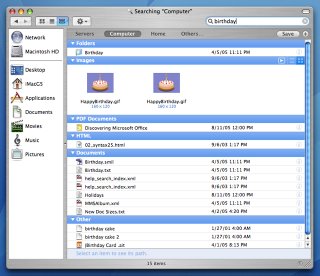
More options will allow you to sort the results based on date, file size, author, plus a few other categories. And the great thing about Spotlight is that it not only searches for filenames, but also searches the contents of the files, such as the actual text inside a Word document or the names of the layers inside a Photoshop file. Let's say you typed a document the other day and want to look for it, but you forgot where you saved it and what filename you used. And then you remember that you typed in the phrase, "I like to wear red panties and paint my nipples pink," inside that particular document. With Spotlight, you can actually type in those words in the search box, and it will be able to locate the document for you. And NO, I don't like wearing red panties. I do, however, enjoy painting my nipples pink...

2. How do I right-click on something?

The first Apple mouse I had was essentially just one big button, and I too wondered about the mystery of the missing right-clicker. To simulate the results of a right-click, hold down the CONTROL key on your keyboard and CLICK on an item. Voila! Mystery of the missing right-clicker solved.

But the Apple Mighty Mouse has left-click, center-click, right-click, side-click, and horizontal & vertical scrolling capabilities. You can also use any standard USB mouse and it should work with your Mac. I have an A4 Tech USB mouse that has 5 buttons and 2 scrollers. The left & right clickers and the scrollers work normally. And the three other buttons I am able to use to execute the Exposé commands. So if you need another mouse, you're not just limited to purchasing Apple's Mighty Mouse which is a bit more pricey than others.

3. What is that keyboard key that has Apple's logo and that other weird shape written on it?

That is the COMMAND key. The command key is used in conjunction with other keys and enables you to perform keyboard shortcuts. Command + Q, for instance, is the keyboard shortcut for quitting an application. Command + C is for COPY, while Command + V is for PASTE.

For more keyboard shortcuts, open System Preferences (you can access this from the Dock or by clicking on the Apple logo located at the upper-left hand corner of your screen) and go to Keyboard & Mouse >>> Keyboard Shortcuts.

I don't know what that other weird shape is called, but I refer to it as "the square with tiny circles sprouting from each corner" or tswtcsfec (pronounced tiz-wuh-tic-see-fec). Some say it's a butterfly while others refer to it as the "infinite loop" (which happens to be the address of Apple's Cupertino headquarters).

4. How do I uninstall an application?

To remove an application, all you have to do is delete the application file or simply drag the application to the Trash. You must delete the application file, and not just the icon that sits on your Dock. You can find the application files (or .app files) by going to the Finder. Simply open a Finder window, click on "Applications" which can be found in the Finder window's left sidebar, and you will see all of your installed applications displayed on the right. Just look for the application file that you would like to uninstall and simply delete it or drag it to the Trash (if the application is inside a folder, then delete the entire folder as well).

An application may place other related files (such as preferences and cache files) in other folders as well. But if you're scared of touching those other stuff or are too lazy to look, then just leave them. You don't have to delete those files. Your system should still work fine. And those other files are usually very small so they won't take up too much space on your hard disk.
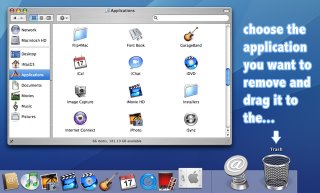
If you want a tool that will help you uninstall an application (including all of those other related files), try AppZapper. It's a nice little program that will look for the other related files of the application that you want to uninstall, so that you won't have to look for them yourself. You can download a trial version from their website that gives you five free "zaps", and if you're satisfied with its performance, then you may purchase a license for it. I wonder if AppZapper can "zap" itself...

5. How do I ctrl+alt+delete an application?

Unresponsive applications, unfortunately, do not just exist in Windows. So if you think that the program you're using has hung or has stopped responding (when that multi-colored circle thingy just won't go away), then press Command + Option + Esc and a window will pop up that will enable you to "force quit" an application. And that multi-colored circle thingy, as cute as it may appear, is referred to by many as "the spinning beachball of death".

And that's FIVE. Do you remember what questions you asked the first time you used a Mac?

Wednesday, April 12, 2006

Win An iPod Shuffle From Microwarehouse Philippines

Register at microwarehouse.com.ph/appleofmyi and pick your top three favorite photo entries from the "Apple Of My i" photo contest for the chance to win a brand new iPod Shuffle from Microwarehouse Philippines.

NOTE: Online voting for favorites is open to the public, but the photo contest winners will be decided on by a set of judges.

Microwarehouse Philippines Invites You To The "Mac Of My Life" Exhibit

Microwarehouse Philippines will have the "Mac of My Life" exhibit on May 6-7, 2006 at the Powerplant Mall, Rockwell. The exhibit will run during mall hours and will feature some of the photo entries from the "Apple Of My i" photo contest. It will be located at the north wing, near the Mango shop. Be sure to check it out! :)

Free Apple Training Seminar From Ynzal Marketing Corp. Philippines

[UPDATE 25-April-2oo6]

Ynzal Marketing Corp. Philippines is holding an Apple Training Seminar at the UP Diliman Law Complex. The seminar date is yet to be announced will be held on April 27, 2006 (Thursday). You may choose to attend either the morning session (8:30am to 12nn), or the afternoon session (1:30pm to 5pm). Registration is FREE.

The topics to be covered at the seminar are as follows:
  1. Getting Started and Mac OS X Basics

  2. Classroom Control using Apple Remote Desktop

  3. Developing Virtual Lesson Objects - QuickTime Virtual Reality

  4. Developing Movies for Teaching and Learning - iMovie

  5. Content Broadcasting - Podcast & Vodcast

  6. Playing with Open Source Applications to Integrate ICT into the Curriculum

  7. Web-Based Mechanisms for School Administration and Course Management - Centre & Moodle

NOTE: Participants must bring their own computer units.

For more details you may call Portia at 413-7575/74 or 373-2232 or email her at portia@ynzal.com. You may also visit ynzal.com/event_apple_training.
 

Disclaimer

Information on this site may contain errors or inaccuracies. PinoyMacLovers is provided "as is" without warranty of any kind as to the correctness or reliability of the site's contents. PinoyMacLovers, and the author thereof, shall not be held responsible or liable, under any circumstances, for any damages resulting from the use or inability to use the information within. Furthermore, PinoyMacLovers is in no way responsible for or has control over the content of any external web site links.

PinoyMacLovers is an independent web site and has not been authorized, sponsored, or otherwise approved by Apple Inc.

Apple, Apple Logos, Macintosh, and Mac OS Logos are registered trademarks of Apple Inc. All other trademarks mentioned belong to their respective owners. If you own rights to any of the content seen here, and do not wish them to appear on this site, you may send an email to copyright [at] pinoymaclovers [dot] com, and they will promptly be removed.

Privacy Policy for PinoyMacLovers.com

The privacy of our visitors to PinoyMacLovers.com is important to us.

At PinoyMacLovers.com, we recognize that privacy of your personal information is important. Here is information on what types of personal information we receive and collect when you use and visit PinoyMacLovers.com, and how we safeguard your information. We never sell your personal information to third parties.

Log Files
As with most other websites, we collect and use the data contained in log files. The information in the log files include your IP (internet protocol) address, your ISP (internet service provider, such as AOL or Shaw Cable), the browser you used to visit our site (such as Internet Explorer or Firefox), the time you visited our site and which pages you visited throughout our site.

Cookies and Web Beacons
We do use cookies to store information, such as your personal preferences when you visit our site. This could include only showing you a popup once in your visit, or the ability to login to some of our features, such as forums.

We also use third party advertisements on PinoyMacLovers.com to support our site. Some of these advertisers may use technology such as cookies and web beacons when they advertise on our site, which will also send these advertisers (such as Google through the Google AdSense program) information including your IP address, your ISP , the browser you used to visit our site, and in some cases, whether you have Flash installed. This is generally used for geotargeting purposes (showing New York real estate ads to someone in New York, for example) or showing certain ads based on specific sites visited (such as showing cooking ads to someone who frequents cooking sites).

DoubleClick DART cookies
We also may use DART cookies for ad serving through Google’s DoubleClick, which places a cookie on your computer when you are browsing the web and visit a site using DoubleClick advertising (including some Google AdSense advertisements). This cookie is used to serve ads specific to you and your interests ("interest based targeting"). The ads served will be targeted based on your previous browsing history (For example, if you have been viewing sites about visiting Las Vegas, you may see Las Vegas hotel advertisements when viewing a non-related site, such as on a site about hockey). DART uses “non personally identifiable information". It does NOT track personal information about you, such as your name, email address, physical address, telephone number, social security numbers, bank account numbers or credit card numbers. You can opt-out of this ad serving on all sites using this advertising by visiting http://www.doubleclick.com/privacy/dart_adserving.aspx

You can choose to disable or selectively turn off our cookies or third-party cookies in your browser settings, or by managing preferences in programs such as Norton Internet Security. However, this can affect how you are able to interact with our site as well as other websites. This could include the inability to login to services or programs, such as logging into forums or accounts.

Deleting cookies does not mean you are permanently opted out of any advertising program. Unless you have settings that disallow cookies, the next time you visit a site running the advertisements, a new cookie will be added.

AdSense Privacy Policy Provided by JenSense