10-day free trial

Wednesday, September 13, 2006

Apple Unveils An All-New iPod Lineup

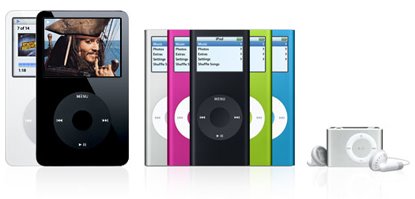
Apple has just recently unveiled new models for their entire iPod lineup. The iPod Shuffle has gotten even smaller and now comes with a built-in clip so you can conveniently attach it to your pocket, sleeve, waistband, etc... The iPod Video, aside from the 30GB model, now comes with 80GB of storage space which lets you store up to 20,000 songs. And finally, the iPod Nano has been completely remastered - thinner design, longer battery life and a brighter display. But it doesn't end there. Aside from being able to choose between the 2GB, 4GB and the new 8GB models, you can also pick from any of the five stunning colors it now comes in - silver, pink, green, blue and black. Yay! :)

Check out:
apple.com/ipod
iPod Nano TV Ad

Saturday, August 26, 2006

The PinoyMacLovers Me & My Mac Project Entry#2

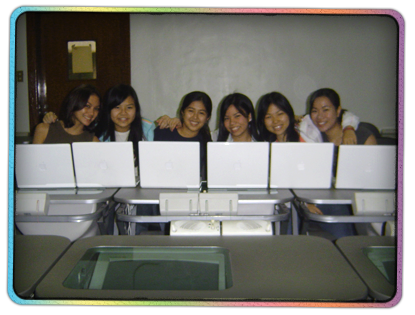
Meet Aby, Darlyn, Dazzle Jamie, Lisa, and Liz:


These girls have just finished an extremely busy semester at their University. It was a very hectic 3 months in which they needed to complete a few course requirements in time for a special Junior Term Abroad program of which they are taking part. Needless to say, this semester proved to be quite the difficult challenge - one that was marked with a lot of stress, very little sleep, and large eyebags. But with perseverance, discipline, and a little help from their trusty 12" iBook G4s, these hardworking students pulled through.

JTAgroup02PinoyMacLovers would like to congratulate Aby, Darlyn, Dazzle Jamie, Lisa, and Liz for all the hardwork they've accomplished. We wish them all the best as they fly off to their respective host countries where they will take part in what will hopefully be an amazing learning experience. And with hardwork, discipline, and a little more help from their trusty 12" iBook G4s, we're pretty sure they'll do great. :)

JTAgroup01Also check out:
The PinoyMacLovers Me & My Mac Project Entry#3
Featured PinoyMacLover: Karylle - The PinoyMacLovers Me & My Mac Project Entry#1

Disclaimer: The PinoyMacLovers Me & My Mac Project is an independent project and has not been authorized, sponsored, or otherwise approved by Apple Computer, Inc. The use of any of the images featured in this project, in whatever manner and for whatever purpose, is prohibited without express and written authorization from the author.

Wednesday, August 16, 2006

PowerPC G4-based Portable Systems Still Available

Apple may have made the switch to Intel, but that doesn't mean you have to (well, for now atleast). Brand new PowerPC G4-based portable systems are still available at Ynzal Marketing Corp. Here are the specs:

PowerBook 12" G4/1.5GHz/512MB/80GB/SuperDrive/APX/BT...P84,980

iBook 12" G4/1.33GHz 512MB/40GB/Combo/APX/BT...P61,980
Promo Price.....P53,980
Educational Discount.....P48,006

I definitely think that any of these models would still be a good purchase (depending on your needs, ofcourse) for those who are thinking of making the switch or puchasing a new notebook computer. Those specifications are still pretty good. They're more than enough for everyday computer tasks such as word processing and web surfing. I'd say they'd perform pretty decently on some light graphics and video editing as well. The big, discounted prices also make these 2 models even more attractive. And don't worry about software and support for PowerPC G4 systems. Those will still be around for a while so you don't need to worry about those G4 computers becoming useless anytime soon. I still have my old 800 MHz iMac G4, which I bought 4 years ago, and it's still very much useful.

For more information, you may contact Ynzal at (+63 2) 373-2232 or 373-3940. But you better hurry if you still want that G4 portable. Stocks are very limited!

Tuesday, August 08, 2006

Apple Unveils New Mac Pro Quad And Previews Mac OS X Leopard


Apple's transition to Intel is now complete, as they finally unveil the new Mac Pro with Quad 64-bit Intel Xeon processors, which was announced at the 2006 Apple Worldwide Developers Conference in San Francisco. omgOMGOMGYAY!!! The lowest configuration comes with two 2GHz Dual-Core Intel Xeon processors, 1GB RAM, 160GB HD, an NVIDIA GeForce 7300 GT 256MB video card, a 16x double-layer SuperDrive and a $2,124(USD) price tag...

Must.Win.Lottery.

Apple also gives us a sneak peak at Mac OS X Leopard, scheduled to ship in Spring 2007. Some new features we should expect to see include: Time Machine - a robust, automated backup system that integrates with an external HD letting you backup and restore your system with great ease; Spaces - an innovative new system that allows you to group your active applications into different windows giving you easier access to a clutter-free desktop. I'm definitely looking forward to its release.

I *heart* Apple. :)

Check out:
apple.com/macpro
apple.com/macosx/leopard

Thursday, August 03, 2006

We Would Like To Thank...

Pinoy Mac Lover "King" from the Philmug.org forum has been sending a few visitors our way thanks to a link in one of his forum posts. Likewise, Karylle fans have also been spreading the word out on "The PinoyMacLovers Me & My Mac Project" over at iGMA.tv. Thanks for all the link love, boys & girls! Love is a many-splendored thing. It makes the world go 'round. All we need is love. Yep. We're feelin' it. :)

Friday, July 21, 2006

Featured PinoyMacLover: Karylle
The PinoyMacLovers Me & My Mac Project Entry#1

The PinoyMacLovers Me & My Mac Project is very simple. It's a little blog project that features photographs of people with their lovely Macs. See? Very Simple.

Our first entry is quite special. We here at PinoyMacLovers were very pleased to find out that local celebrity, Karylle (a multi-talented singer and television & movie actress), is the proud and happy owner of a 12" PowerBook G4. She just loves her Mac so much and graciously agreed to sit down with us for a short Q&A session.

PML: So when did you make the switch to Mac?

Karylle: I've always wanted to buy a laptop, but I've been too kuripot to buy one so I actually spent my college years cramming in internet cafes, which were later converted into internet gaming spots with kids who cut class and swore constantly. I don't know why I put up with that, but mainly it was because I didn't know what laptop to get. When we started with Encantadia, I wanted to reward myself by finally getting a laptop. It took a while for me to decide, but everyone recommended that I get a Mac. And after I got one, Iza [Calzado] and Alfred [Vargas] also got Macs. Actually we had Macs all lined up in the set, Direk Mark Reyes brings his and so do Jennylyn [Mercado], Diana [Zubiri] and Sunshine [Dizon].


PML: How did you feel when you finally got your Mac and used it for the first time?

Karylle: Oh I was so happy! I felt like I made the right choice even if it did cost a lot.


PML: What's your favorite iLife program?

Karylle: The one I use most is iTunes because of work. But because I love, love, love to take pictures I also use iPhoto all the time. I've actually printed two books already using iPhoto. They make great gifts. But my new favorite has to be iDVD, which I just learned how to use. I made a bunch of DVDs from my summer trip.


PML: What are the typical things you do using your Mac?

Karylle: I bring it everywhere, everyday. Haha! I watch DVDs. I make DVDs of pics. I use GarageBand to record voice lessons and jamming sessions. I love to write for my blog, make little photoshop projects. I always use it during taping so I won't get bored.


PML: Are there any other special people in your life who also have and love Macs, and what kind of Macs do they have?

Karylle: My mom [Zsa Zsa Padilla] also has a Mac. She has a 17" PowerBook G4. Dong [Dantes] has an iMac G5, but he's always using my PowerBook.


PML: Your mother is often referred to as the Divine Diva. Would you call your PowerBook the Divine Laptop?

Karylle: No, but my mom's PowerBook can be the Divine Laptop.


PML: If you were asked to pick a song to dedicate to your PowerBook, what would it be?

Karylle: "Inseparable" by Natalie Cole. My Powerbook is always with me wherever I go.

Karylle has just been nominated for Favorite Female Artist in a Video at the MTV Pilipinas Video Music Awards 2006 for her song, You Make Me Sing. Please vote for her by logging onto pinoyexchange.com/mtv or by texting "Mtvvote FFA Karylle" (send to 638 for Smart subscribers or 2219 for non-Smart subscribers). You can also visit her official website at Karylle.com.

Also check out:
PinoyMacLovers Me & My Mac Project Entry#2

Disclaimer: The PinoyMacLovers Me & My Mac Project is an independent project and has not been authorized, sponsored, or otherwise approved by Apple Computer, Inc. The use of any of the images featured in this project, in whatever manner and for whatever purpose, is prohibited without express and written authorization from the author.
Thursday, July 20, 2006

Mac OS X Tip Of The Day: Giving Your Favorite Files And Folders Easier Access

This very simple tip will teach you how to create and place a file or folder shortcut in the Finder's left sidebar.

I'm a neat freak. Even in the virtual realm. So my computer has tons of folders with subfolders that have their own subfolders, and so on... That's just how I like my files. I like to keep them extremely organized. But oftentimes, looking for a particular file or folder becomes quite the tedious task (epecially if you're forgetful, like I am). Spotlight actually makes things a lot easier to find. All I have to do is type in the file or folder name.... VOILA! But for my "favorite" folders (the ones I always access, but for some reason, still always have difficulty finding), I create shortcuts that lead to them, and these shortcuts are placed neatly in the Finder's left sidebar. It makes things a lot easier for me. Just one click, and I'm inside my favorite folder. So here's how to do it:

Launch Finder, and look for the file or folder that you would like to create a shortcut to. Then simply click and drag the file or folder onto the left sidebar, and release:

And you're done!

If you'd like to remove the shortcut, simply click and drag it outside of the sidebar, release, and poof (you'll really see it go poof)!

Sunday, July 09, 2006

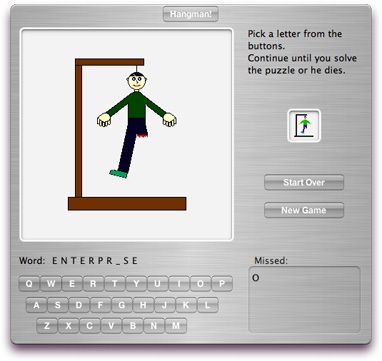
Widget World: Hangman!

Yep. It's that guessing game where you draw a man who's about to be hung, and then you keep on choosing letters until you guess the right word. And the more wrong letters you choose, the closer the man comes to his tragic and painful death. It's so morbid. I absolutely love it!


A guy named David Reeves created a widget version of this simple yet fun game which you can download here. I like widgets like these. They keep me busy and productive while I'm at the office.

Wednesday, July 05, 2006

Yahoo! Finally Updates Yahoo! Messenger For Mac

I think I've been using the same lame old version of Yahoo! Messenger for Mac since 2003. But now, Yahoo! has recently released Yahoo! Messenger for Mac 3.0 Beta 1. Yes, it's still in Beta, but I'm glad to know that Yahoo! hasn't completely written off Mac users. It's got an entirely new look which I find very nice. It looks alot like Safari with a steel-like design and feel to it. And I can finally use an avatar or a display image just like with Yahoo! Messenger for Windows. Also, the "buzz" sound is alot subtler now. The old one was just a little too annoying for me. But the main improvement I'd like to see with Yahoo! Messenger for Mac would be better interoperability with its Windows counterpart. And so far, this new version seems to disappoint. I'm able to send files easily to another Windows user, but I can't seem to receive files from their end. Also, I now seem to be unable to have a webcam chat a user on Yahoo! Messenger for Windows. With the previous version of Yahoo! Messenger for Mac, webcam chat was possible between a Mac and a Windows user, albeit the quality of the connection was horrible. But I certainly can't say for sure that this is the case for everyone else who's tried the new version. Perhaps others are having less problems than I am. But, as I've said, I'm still glad that they've finally updated, and I hope that the upcoming versions will improve. Check out messenger.yahoo.com for more details.

Friday, June 30, 2006

The PinoyMacLovers iLove iPod Project Entry#3

Donna got her a iPod as a special gift from her boyfriend Nic - who happens to be our iPod lovin' beach bum from last May. Donna and her white 1GB iPod Nano go well together because they're just both so adorably petite (Donna stands 5'1" and weighs in at a light 92lbs). Her friends tease her endearingly, calling her the Unano with a Nano (unano means little person). Here's a photo of Donna and her Nano. Aren't they cute? :)


Also check out:
PinoyMacLovers iLove iPod Project Entry#2
PinoyMacLovers iLove iPod Project Entry#4

Disclaimer: The PinoyMacLovers iLove iPod Project is an independent project and has not been authorized, sponsored, or otherwise approved by Apple Computer, Inc. The use of any of the images featured in this project, in whatever manner and for whatever purpose, is prohibited without express and written authorization from the author.

Sunday, June 18, 2006

Lani Pillinger Photos

[UPDATE 25-July-2006]
I've finally been able to find a few Lani Pillinger photos to post on my site. Talented photographer, Carla Y. Berroya-Foster, was very gracious and allowed me to post some of the photographs she took of Ms. Pillinger. Hope you like the pictures! :)


You may get in touch with Carla Y. Berroya-Foster by sending her an email at carla_berroya [at] yahoo [dot] com. You may also visit her flickr album where you will see a diverse array of her work that includes portraits, events photos, and fashion & modeling shoots.

*****

[UPDATE 01-July-2006]
The Apple Of My i gallery seems to be inaccessible now. I don't know if it will be up again.

*****

I get a siginificant amount of daily web traffic from people doing internet search queries for pictures of Ms. Lani Pillinger. I actually just mentioned her once in a previous entry, where I wrote about the winners of the Apple Of My i photo contest. The photograph featuring Lani Pillinger as the subject won third place for one of the said competition's categories. I don't know much about Lani Pillinger, but a quick google search will tell you that she is a Fil-Australian model who appeared with the popular local band, Hale, in a Nescafe ad. She is also currently being linked to local actor, Marvin Agustin.

If you'd like to view photos of her, you can visit the Apple Of My i photo gallery, which is still available for viewing as of this post. Click here and here.

Saturday, June 17, 2006

Ynzal's Back-To-School Promo - Discounts On Apple Products For Students And Teachers

Ynzal Marketing Corp. Philippines is having a special back-to-school promo. Teachers and students can avail of fantastic discounts on selected Apple products and other third-party accessories. Here's a list of some of the products on sale:

Apple iSight.....P8,900
Promo Price.....P6,490

iPod Video 60GB Black/White.....P24,500
Promo Price.....P19,980

iPod Nano 2GB White/Black.....P11,500
Promo Price.....P9,980

iPod nano 4GB White/Black.....P14,500
Promo Price.....P11,980

iPod Shuffle 512MB.....P4,800
Promo Price.....P4,400

iPod Shuffle 1GB.....P8,980
Promo Price.....P5,500

Sonnet iPod Battery Replacement.....P1,980
Promo Price.....P1,700

iPod USB Power Adapter.....P1,380
Promo Price.....P1,100

Sonnet PodFreq Premium FM Transmitter + Car Charger + Dock for iPod....P6,380
Promo Price.....P4,200

iPod Hi-Fi.......P20,980
Promo Price.....P19,980

Students and teachers are required to present a valid school ID in order to avail of the educational discount. Promo is valid until 30 June 2006 or until supplies last. For more information regarding this promotion and the other products on sale, you may contact Ynzal Marketing Corp. Philippines at 413-7575/74 or 413-7579/78.

Disclaimer: PinoyMacLovers.Com is an independent website and has not been authorized, sponsored, or otherwise approved by Ynzal Marketing Corp. Philippines. We simply wish to provide this information to our readers, and we advise them to please verify with Ynzal as to its correctness.

Join National Bookstore's TEXTciting Matuto! TEXTciting Manalo! Raffle Promo

Over 3 Million Pesos worth of prizes will be given away in the National Bookstore TEXTciting Matuto! TEXTciting Manalo! Raffle Promo. Prizes to be given away include 25 iPod Videos, 25 iPod Nanos, 25 iPod Shuffles and so much more (cash prizes, digicams, PDAs, etc...)!

How to participate:

1. Every Php 300 single receipt purchasee, inclusive of any specially-marked products, entitles you to one raffle entry.

2. To indicate that a participating product has been purchased, an asterisk will be automatically printed on the receipt, beside the name of the participating product.

3. Only receipts marked with asterisks (*) are qualified for an entry.

4. To send an entry, key in:

NBS[space]Sales Invoice Number (this can be found on your receipt)[slash]Amount Of Purchase and send to 2966

Ex: NBS 7494500051010088/315

5. Receipts must be kept. Winners will need to present them to claim their prize.

*Send in your entries until 30 June 2006. Draw date is on 14 July 2006.

Friday, June 02, 2006

Buy New Underwear For The Chance To Win An iPod Nano!

Underwear is an essential piece of clothing. It keeps things in place and prevents unwanted chafing. So it's always good to keep your clothes drawer stocked with fresh pairs. If you need to buy new ones, you might want to head on over to your nearest Robinsons Department Store to get up to 50% off on selected items. This is part of their underwear fair entitled "Down to Basics" that runs for the entire month of June 2006. And for every Php 300 single or accumulated receipt purchase, you will get a raffle coupon for the chance to be one of 20 winners of a brand new iPod Nano! Never has the prospect of buying new underwear become so exciting! And you also have the chance to meet and greet some local celebrities who are participating in the event (I'm just not sure whether they'll be fully clothed or walking around in their underwear). Visit any of the Robinsons Deparment Store branches for more details.

Thursday, June 01, 2006

Setting The Default Web Browser On A Mac

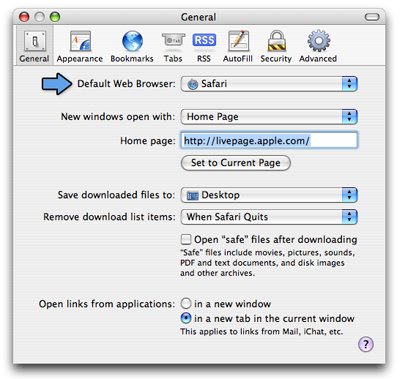
I've switched from one browser to another numerous times. I started out with Internet Explorer (which I hate), and eventually switched to Netscape. And then Safari was born so I started using that. I liked using Safari and stayed with it for quite some time. But I would come to realize that my browser switching days were far from over as I would eventually switch to Firefox (at that time, I thought tabbed browsing was the best thing since sliced bread). And then I discovered Camino, and wanted to know what it was like to use it. I wasn't particularly impressed, so I decided to go back to Safari (which welcomed me once again with open arms and, at that time, new tabbed browsing capabilities). Currently, Safari and I remain very happy together.

When you install a new browser, it usually asks you if you would like to set it as the default one for your system. Click YES, and the new default browser is set. If you'd like to change the default web browser back to any of the previous browsers that you have, you can use Safari. Just open the program, go to Preferences, and under the General tab, you will find an option that will allow you to select your new default browser.


*Note: Camino's General Preferences will let you do the same thing.
 

Disclaimer

Information on this site may contain errors or inaccuracies. PinoyMacLovers is provided "as is" without warranty of any kind as to the correctness or reliability of the site's contents. PinoyMacLovers, and the author thereof, shall not be held responsible or liable, under any circumstances, for any damages resulting from the use or inability to use the information within. Furthermore, PinoyMacLovers is in no way responsible for or has control over the content of any external web site links.

PinoyMacLovers is an independent web site and has not been authorized, sponsored, or otherwise approved by Apple Inc.

Apple, Apple Logos, Macintosh, and Mac OS Logos are registered trademarks of Apple Inc. All other trademarks mentioned belong to their respective owners. If you own rights to any of the content seen here, and do not wish them to appear on this site, you may send an email to copyright [at] pinoymaclovers [dot] com, and they will promptly be removed.

Privacy Policy for PinoyMacLovers.com

The privacy of our visitors to PinoyMacLovers.com is important to us.

At PinoyMacLovers.com, we recognize that privacy of your personal information is important. Here is information on what types of personal information we receive and collect when you use and visit PinoyMacLovers.com, and how we safeguard your information. We never sell your personal information to third parties.

Log Files
As with most other websites, we collect and use the data contained in log files. The information in the log files include your IP (internet protocol) address, your ISP (internet service provider, such as AOL or Shaw Cable), the browser you used to visit our site (such as Internet Explorer or Firefox), the time you visited our site and which pages you visited throughout our site.

Cookies and Web Beacons
We do use cookies to store information, such as your personal preferences when you visit our site. This could include only showing you a popup once in your visit, or the ability to login to some of our features, such as forums.

We also use third party advertisements on PinoyMacLovers.com to support our site. Some of these advertisers may use technology such as cookies and web beacons when they advertise on our site, which will also send these advertisers (such as Google through the Google AdSense program) information including your IP address, your ISP , the browser you used to visit our site, and in some cases, whether you have Flash installed. This is generally used for geotargeting purposes (showing New York real estate ads to someone in New York, for example) or showing certain ads based on specific sites visited (such as showing cooking ads to someone who frequents cooking sites).

DoubleClick DART cookies
We also may use DART cookies for ad serving through Google’s DoubleClick, which places a cookie on your computer when you are browsing the web and visit a site using DoubleClick advertising (including some Google AdSense advertisements). This cookie is used to serve ads specific to you and your interests ("interest based targeting"). The ads served will be targeted based on your previous browsing history (For example, if you have been viewing sites about visiting Las Vegas, you may see Las Vegas hotel advertisements when viewing a non-related site, such as on a site about hockey). DART uses “non personally identifiable information". It does NOT track personal information about you, such as your name, email address, physical address, telephone number, social security numbers, bank account numbers or credit card numbers. You can opt-out of this ad serving on all sites using this advertising by visiting http://www.doubleclick.com/privacy/dart_adserving.aspx

You can choose to disable or selectively turn off our cookies or third-party cookies in your browser settings, or by managing preferences in programs such as Norton Internet Security. However, this can affect how you are able to interact with our site as well as other websites. This could include the inability to login to services or programs, such as logging into forums or accounts.

Deleting cookies does not mean you are permanently opted out of any advertising program. Unless you have settings that disallow cookies, the next time you visit a site running the advertisements, a new cookie will be added.

AdSense Privacy Policy Provided by JenSense