So for those of you who've been to the site before, you will notice that it now has a new look. It's quite nice, if I do say so myself ;-). It's very neat and clean. It actually took me a while to fix this design because I had to test the layout in different browsers to see if everything came out the way they should. Everything was ok except that Internet Explorer kept messing things up. So everytime it did, I had to put a fix in the HTML code and then re-publish the site and check again. Sometimes, a fix for Internet Explorer would cause problems with other browsers. Needless to say, I was not very happy. I would have loved to just NOT care about how my site looks in IE, but I can't because a vast majority of people who surf the internet actually use that horrible browser. So if you have the time, I would like to implore you to please get a better browser like Firefox. We have better options, people!
Anyway... I hope you all like the new design! :)
Monday, March 27, 2006

Sunday, March 19, 2006
Bluetooth Headset For Mac And How To Use It With iChat AV and Skype
The Mac OS X 10.4.4 update included an iChat update that allows the program to detect if you're using a Bluetooth headset as your audio device. So I went around and looked for a Bluetooth headset and found that my dad had one for his mobile phone. He wasn't using it anymore so he gave it to me. It's a Jabra BT 250 headset.
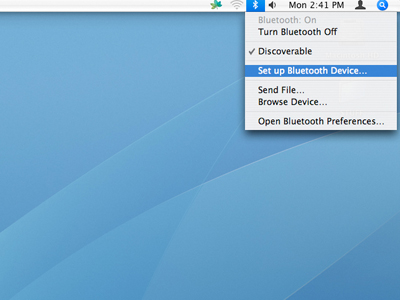
 I got pretty excited to see if it would work with as a Bluetooth headset for my iMac G5 (PowerPC) and it did! I was able to easily pair the headset and my mac with each other. I just made sure that the Jabra BT 250 was in pairing mode (turn it off then press and hold the power on button for about 8 seconds until you see a solid blue light) and then I clicked the Bluetooth icon on my menu bar, selected "set up Bluetooth device" and followed the simple instructions. Voila! A Bluetooth headset for my iMac! It works just like any regular sound output and sound input device.
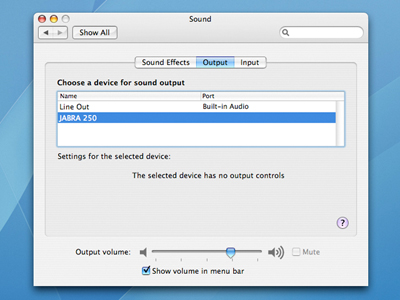
 Once properly paired, you can go to System Preferences open the Sound panel and select JABRA 250 as your sound input and sound output device.
 I even tried using it with iMovie and was able to record a voice clip using the headset's microphone. But I don't think you'd like to use the earphone to listen to your music because your internal speakers will give you way better quality.
But the Jabra BT 250 sound output quality is good enough for voice chat. I tried using it with iChat AV and Skype - both programs were able to succesfuly recognize the bluetooth headset, and I was able to use it to chat with friends:
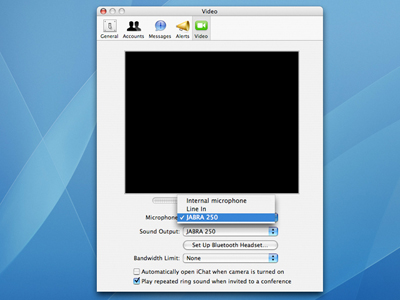
For iChat AV, open iChat AV Preferences and go to the Video panel. From there, you can select JABRA 250 as your microphone and sound output device. If you haven't paired the headset with the iMac yet, you can set it up from the iChat Preferences > Video panel by clicking on the "Set Up Bluetooth Headset" button.
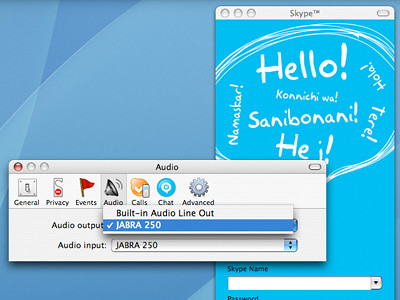
For Skype, open Skype Preferences and go to the Audio panel. From there, you can select JABRA 250 as your audio output and audio input device.
Troubleshooting: If the headset doesn't work even after you've succesfully paired your headset with your Bluetooth enabled Mac, and have properly set up the preferences for your iChat AV and Skype programs, try going to System Preferences and, from the Sound panel, make sure that you select JABRA 250 as your sound output and sound input device also. And make sure that you have the latest versions of iChat AV & Skype, and that you have Mac OS X 10.4.4 or higher.
What other Bluetooth headsets for the Mac do you recommend?
 Once properly paired, you can go to System Preferences open the Sound panel and select JABRA 250 as your sound input and sound output device.
 I even tried using it with iMovie and was able to record a voice clip using the headset's microphone. But I don't think you'd like to use the earphone to listen to your music because your internal speakers will give you way better quality.
But the Jabra BT 250 sound output quality is good enough for voice chat. I tried using it with iChat AV and Skype - both programs were able to succesfuly recognize the bluetooth headset, and I was able to use it to chat with friends:
For iChat AV, open iChat AV Preferences and go to the Video panel. From there, you can select JABRA 250 as your microphone and sound output device. If you haven't paired the headset with the iMac yet, you can set it up from the iChat Preferences > Video panel by clicking on the "Set Up Bluetooth Headset" button.
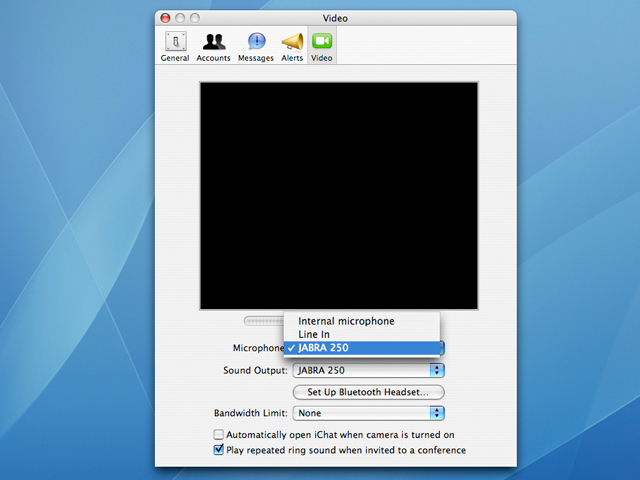
For Skype, open Skype Preferences and go to the Audio panel. From there, you can select JABRA 250 as your audio output and audio input device.
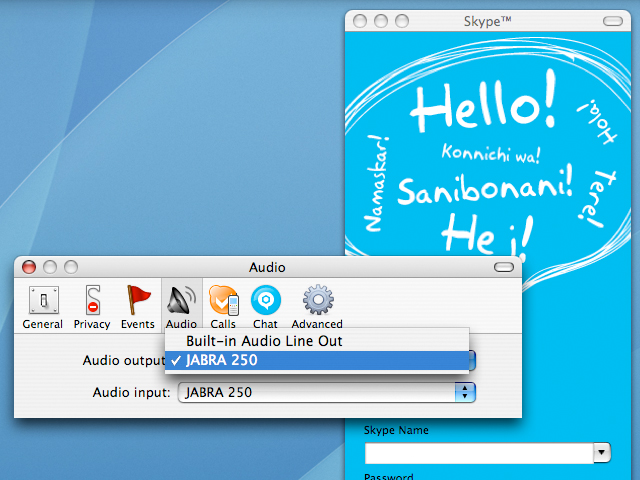
Troubleshooting: If the headset doesn't work even after you've succesfully paired your headset with your Bluetooth enabled Mac, and have properly set up the preferences for your iChat AV and Skype programs, try going to System Preferences and, from the Sound panel, make sure that you select JABRA 250 as your sound output and sound input device also. And make sure that you have the latest versions of iChat AV & Skype, and that you have Mac OS X 10.4.4 or higher.
What other Bluetooth headsets for the Mac do you recommend?
Saturday, March 18, 2006
Wednesday, March 15, 2006
Widget World: iStat Nano
 I usually like checking my system stats, especially when I'm multitasking. I check mainly for CPU usage to see which applications are taking up most of the processing resources, and I also like to check my bandwidth to see if my downloads are moving along just fine. I can do those things using the Activity Monitor which can be found in the Applications > Utilities folder when you go to Finder, but the iStat Nano widget by iSlayer provides a much more streamlined interface in a tiny and nice-looking window. You can check for things like CPU usage, free memory, hard drive space, IP and external IP address, bandwidth, CPU temperature, battery, etc... It even tells you how long your Mac's been running since the last time you powered it on. It's a pretty cool widget for obsessive compulsive users like moi.
Go get the iStat Nano widget.
Tuesday, March 14, 2006
iMac G5 Pictures!
I've finally gotten some time off from my busy schedule of watching cartoons and eating junk food so I could take some photos of my 20" 2.1 GHz PowerPC iMac G5 with built-in iSight. It's one of the most beautiful things I have ever layed eyes on...
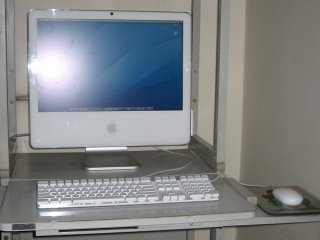
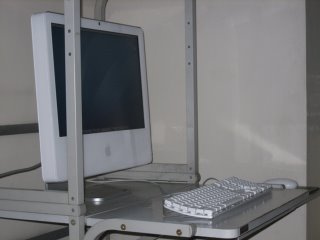
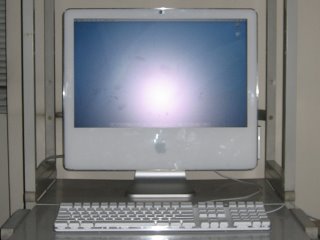 The gorgeous 20" display is just so HUGE! It gives me so much room to work on. I love it!
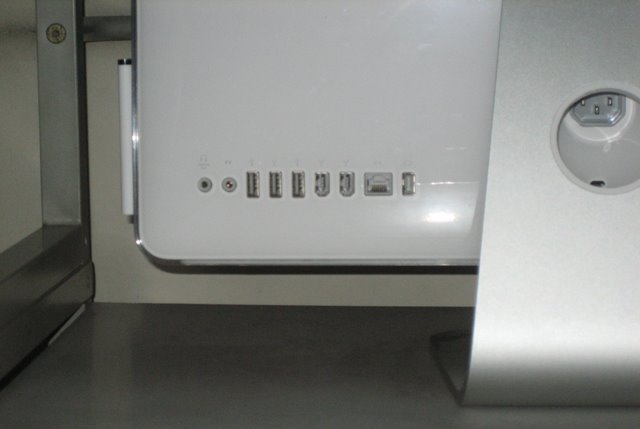
Here's the back view:
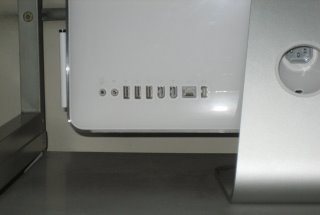
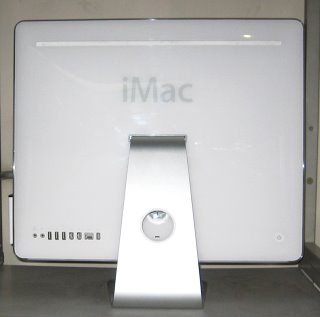 All the ports are lined up horizontally. You have the Audio out, Audio line-in, USB 2.0 (3), FireWire (2), Ethernet and Video out ports:
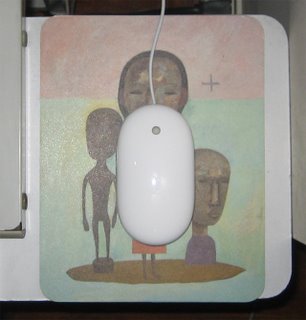
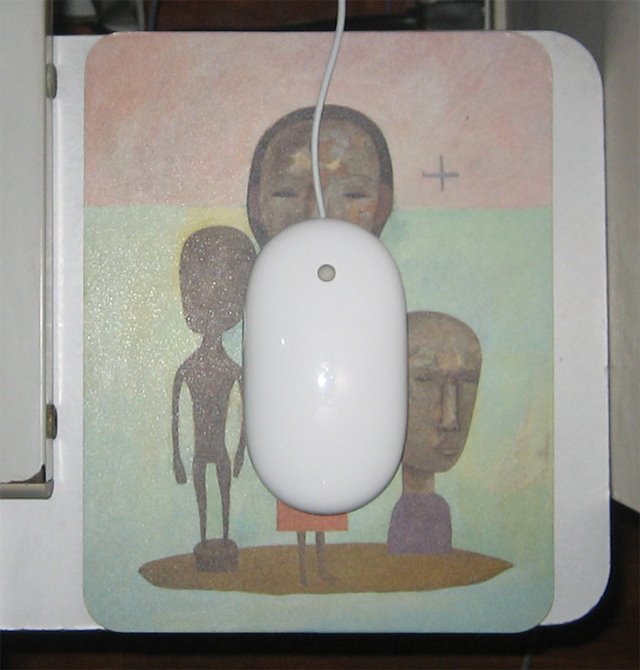
 The keyboard and Mighty Mouse, so clean and white:

 Here is the built-in iSight, which I use to play with Photo Booth and to have video conferences with random strangers all the way from Uzbekistan to Timbuktu:
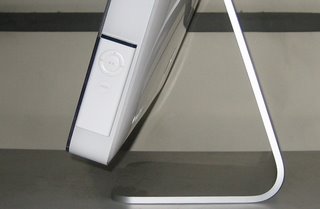
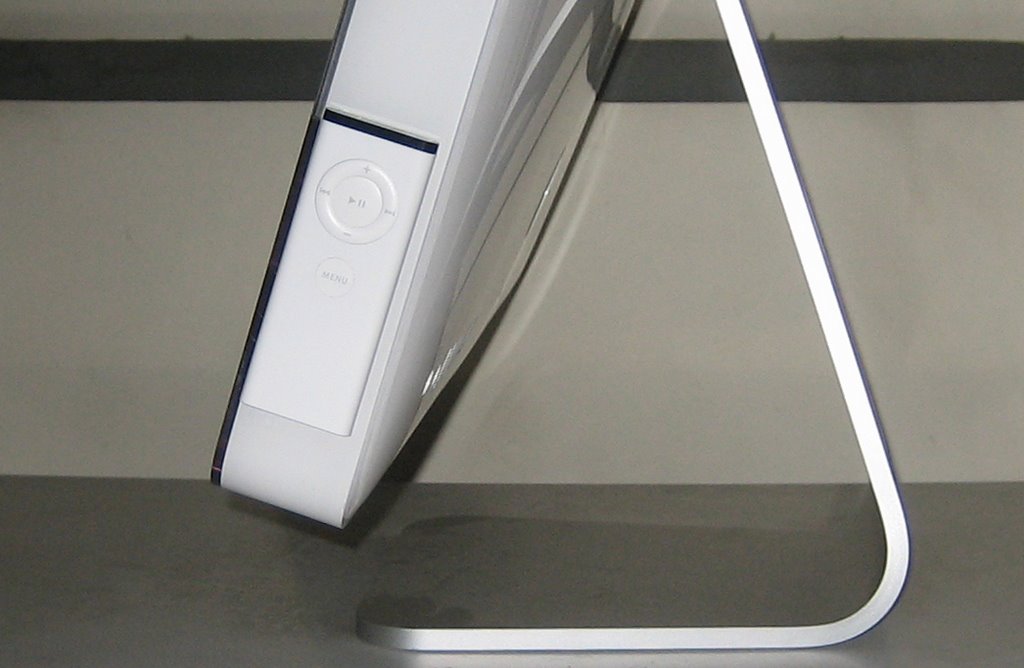
 The Apple Remote allows easy access to Front Row where I can listen to music and view photo slide shows & videos on the 20" widescreen display. When not in use, you can attach it to the lower-right side of the iMac. It sticks itself to it using magnetic energy.
 So there you have it folks - the very loverly iMac. It's so beautiful, it just brings tears to my eyes. *Sniff Sniff*
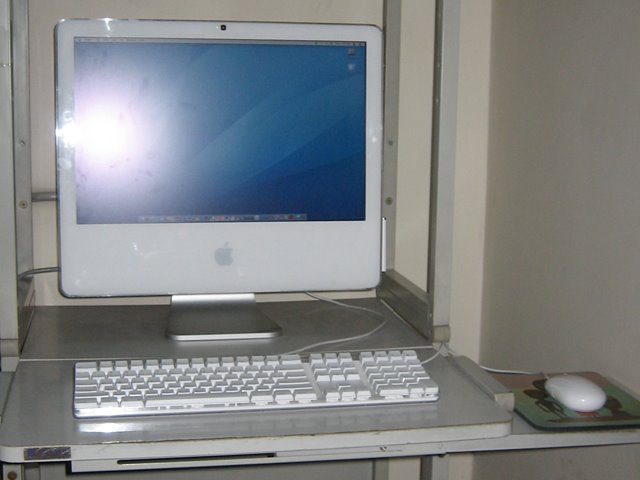

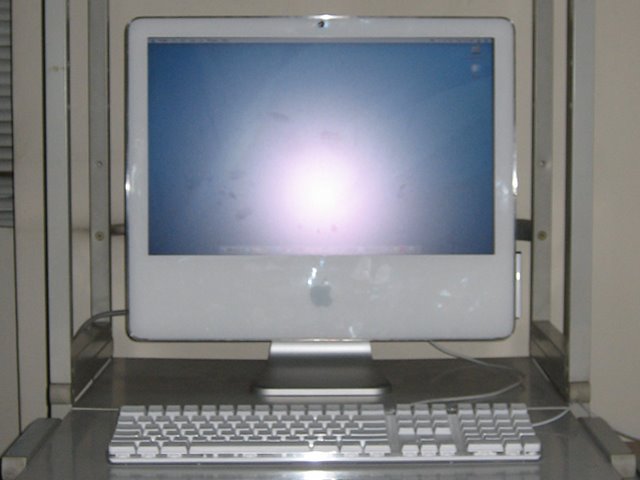 The gorgeous 20" display is just so HUGE! It gives me so much room to work on. I love it!
Here's the back view:
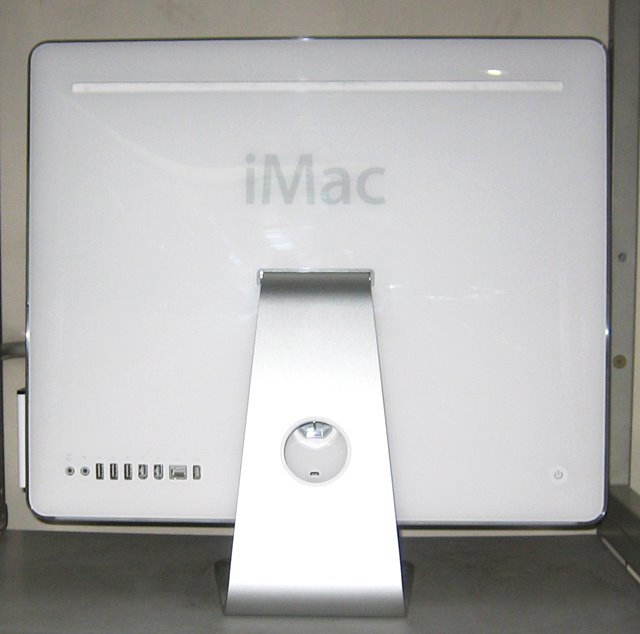 All the ports are lined up horizontally. You have the Audio out, Audio line-in, USB 2.0 (3), FireWire (2), Ethernet and Video out ports:
 The keyboard and Mighty Mouse, so clean and white:
 Here is the built-in iSight, which I use to play with Photo Booth and to have video conferences with random strangers all the way from Uzbekistan to Timbuktu:
 The Apple Remote allows easy access to Front Row where I can listen to music and view photo slide shows & videos on the 20" widescreen display. When not in use, you can attach it to the lower-right side of the iMac. It sticks itself to it using magnetic energy.
 So there you have it folks - the very loverly iMac. It's so beautiful, it just brings tears to my eyes. *Sniff Sniff*
Friday, March 03, 2006
Mac Mini Goes Intel
Apple recently unveiled the new Mac mini, which now holds an Intel chip inside its tiny little body. The low-end model has a 1.5GHz Intel Core Solo processor, and is priced at $599. While the high-end one uses a 1.66GHz Intel Core Duo processor, and starts at $799.
The PowerPC Mac mini has been discontinued so if you still want to get one of those, you better go to a reseller now before stocks permanently run out. Find out more about the new Intel Mac mini at apple.com.
The PowerPC Mac mini has been discontinued so if you still want to get one of those, you better go to a reseller now before stocks permanently run out. Find out more about the new Intel Mac mini at apple.com.
Saturday, February 25, 2006
Return Of The Mac!
[UPDATE: 22 MARCH 2006]: So this page actually gets a lot of hits from people doing internet searches on the actual "Return of the Mack" song. While this article really isn't about that, I've decided to place some information about it at the end of this article (and the lyrics too).
***
Remember that song? It goes:
(Return of the Mac) once again
(Return of the Mac) pump up the world
(Return of the Mac) watch my flow
(You know that I'll be back) here I go
It's a song by Mark Morrison who happens to be a one hit wonder from the 90s era. The song is actually entitled "Return of the MACK", with a K at the end, but who cares? Although it was quite popular back then. However, I am not singing this song out of a sense of nostalgia from my days as a youthful teenager, but rather, I sing in jubilation for my Mac is now BACK! Yes, after more than two months of waiting for it to be fixed, it is now once again in my possession. TWO MONTHS, you emphatically say? Yes. It took that long. Why, you ask? Well, I find that there is no better way to explain it than by telling you that the service center I sent it to SUCKS! But anyway, it's here. I picked it up at the service center last Tuesday and they tried to appease me by giving profuse apologies and measly freebies like mouse pads, keychains and a lapel mic. Although I must admit, I did like the lapel mic. But at any rate, my Mac seems to be working splendidly so I am once again in a celebratory mood. Happy! Happy! Joy! Joy!
Also, I know it's a little anti-climactic given that the new Intel iMacs just came out and the Macbook Pro is finally shipping, but I will post pictures of my PowerPC iMac G5 with built in iSight soon. It's still very nice to look at anyway. In the meantime, feel free to sing with me... (Return of the Mac) once again, (Return of the Mac) pump up the world, (Return of the Mac) watch my flow, (You know that I'll be back) here I go... Word.
***
As promised, here's some info on "Return of the Mack":
The song "Return of the Mack" was made popular by an artist named Mark Morrison back in the late 90's. The song is one of twelve tracks from his album also entitled "Return of the Mack" which was originally released in 11 March 1997. The album actually contains two "Return of the Mack" songs, the other one being "Return of the Mack (Da Beatminerz Remix)".
Return Of The Mack
Mark Morrison
Album: Return Of The Mack
Oh, oo-o-oh, come on, ooh, yeah
Well I tried to tell you so (yes, I did)
But I guess you didn't know, as I said the story goes
Baby, now I got the flow
'Cos I knew it from the start
Baby, when you broke my heart
That I had to come again, and show you that I'm real
(You lied to me) all those times I said that I love you
(You lied to me) yes, I tried, yes, I tried
(You lied to me) even though you know I'd die for you
(You lied to me) yes, I cried, yes, I cried
ONE
(Return of the Mack) it is
(Return of the Mack) come on
(Return of the Mack) oh my God
(You know that I'll be back) here I am
(Return of the Mack) once again
(Return of the Mack) pump up the world
(Return of the Mack) watch my flow
(You know that I'll be back) here I go
So I'm back up in the game
Running things to keep my swing
Letting all the people know
That I'm back to run the show
'Cos what you did, you know, was wrong
And all the nasty things you've done
So, baby, listen carefully
While I sing my come-back song
TWO
(You lied to me) 'cos she said she'd never turn on me
(You lied to me) but you did, but you do
(You lied to me) all these pains you said I'd never feel
(You lied to me) but I do, but I do, do, do
(Return of the Mack) here it is
(Return of the Mack) hold on
(Return of the Mack) don't you know
(You know that I'll be back) here I go
(Return of the Mack) oh little girl
(Return of the Mack) wants my pearl
(Return of the Mack) up and down
(You know that I'll be back) round and round
(repeat TWO, ONE)
(You know that I'll be back) don't you know
(Return of the Mack) here it is
(Return of the Mack) hold on
(Return of the Mack) be strong
(You know that I'll be back) here I go
(Return of the Mack) my little girl
(Return of the Mack) wants my pearl
(Return of the Mack) up and down
(You know that I'll be back) round and round
***
Remember that song? It goes:
(Return of the Mac) once again
(Return of the Mac) pump up the world
(Return of the Mac) watch my flow
(You know that I'll be back) here I go
It's a song by Mark Morrison who happens to be a one hit wonder from the 90s era. The song is actually entitled "Return of the MACK", with a K at the end, but who cares? Although it was quite popular back then. However, I am not singing this song out of a sense of nostalgia from my days as a youthful teenager, but rather, I sing in jubilation for my Mac is now BACK! Yes, after more than two months of waiting for it to be fixed, it is now once again in my possession. TWO MONTHS, you emphatically say? Yes. It took that long. Why, you ask? Well, I find that there is no better way to explain it than by telling you that the service center I sent it to SUCKS! But anyway, it's here. I picked it up at the service center last Tuesday and they tried to appease me by giving profuse apologies and measly freebies like mouse pads, keychains and a lapel mic. Although I must admit, I did like the lapel mic. But at any rate, my Mac seems to be working splendidly so I am once again in a celebratory mood. Happy! Happy! Joy! Joy!
Also, I know it's a little anti-climactic given that the new Intel iMacs just came out and the Macbook Pro is finally shipping, but I will post pictures of my PowerPC iMac G5 with built in iSight soon. It's still very nice to look at anyway. In the meantime, feel free to sing with me... (Return of the Mac) once again, (Return of the Mac) pump up the world, (Return of the Mac) watch my flow, (You know that I'll be back) here I go... Word.
***
As promised, here's some info on "Return of the Mack":
The song "Return of the Mack" was made popular by an artist named Mark Morrison back in the late 90's. The song is one of twelve tracks from his album also entitled "Return of the Mack" which was originally released in 11 March 1997. The album actually contains two "Return of the Mack" songs, the other one being "Return of the Mack (Da Beatminerz Remix)".
Return Of The Mack
Mark Morrison
Album: Return Of The Mack
Oh, oo-o-oh, come on, ooh, yeah
Well I tried to tell you so (yes, I did)
But I guess you didn't know, as I said the story goes
Baby, now I got the flow
'Cos I knew it from the start
Baby, when you broke my heart
That I had to come again, and show you that I'm real
(You lied to me) all those times I said that I love you
(You lied to me) yes, I tried, yes, I tried
(You lied to me) even though you know I'd die for you
(You lied to me) yes, I cried, yes, I cried
ONE
(Return of the Mack) it is
(Return of the Mack) come on
(Return of the Mack) oh my God
(You know that I'll be back) here I am
(Return of the Mack) once again
(Return of the Mack) pump up the world
(Return of the Mack) watch my flow
(You know that I'll be back) here I go
So I'm back up in the game
Running things to keep my swing
Letting all the people know
That I'm back to run the show
'Cos what you did, you know, was wrong
And all the nasty things you've done
So, baby, listen carefully
While I sing my come-back song
TWO
(You lied to me) 'cos she said she'd never turn on me
(You lied to me) but you did, but you do
(You lied to me) all these pains you said I'd never feel
(You lied to me) but I do, but I do, do, do
(Return of the Mack) here it is
(Return of the Mack) hold on
(Return of the Mack) don't you know
(You know that I'll be back) here I go
(Return of the Mack) oh little girl
(Return of the Mack) wants my pearl
(Return of the Mack) up and down
(You know that I'll be back) round and round
(repeat TWO, ONE)
(You know that I'll be back) don't you know
(Return of the Mack) here it is
(Return of the Mack) hold on
(Return of the Mack) be strong
(You know that I'll be back) here I go
(Return of the Mack) my little girl
(Return of the Mack) wants my pearl
(Return of the Mack) up and down
(You know that I'll be back) round and round
Wednesday, February 22, 2006
Widget World: Say Cheese
UPDATE [04-April-2007]:
I just checked the Killer Widgets website and it seems to be up again. Now go get your copy of the Say Cheese widget. :)
UPDATE [18-June-2006]:
The Say Cheese widget seems to be unavailable for download. It's no longer in the Apple Dashboard downloads section. And the creators' website seems to be unavailable as well.

I just checked the Killer Widgets website and it seems to be up again. Now go get your copy of the Say Cheese widget. :)
UPDATE [18-June-2006]:
The Say Cheese widget seems to be unavailable for download. It's no longer in the Apple Dashboard downloads section. And the creators' website seems to be unavailable as well.
**********
Whenever I'm feeling overwhelmed with all of the world's bad news, I turn to the daily comics section of my newspaper and gain enlightenment from the words of wisdom that Calvin & Hobbes have to offer. And now, after installing the Say Cheese widget, I can get my daily dose of comic strip entertainment from the comfort of my own dashboard (reading the newspaper often triggers my early morning allergies).
The Say Cheese widget, developed by Killer Widgets, features daily comic strips from Calvin & Hobbes, Dilbert, and Garfield to name a few. You can also view archives of previous strips with the handy date selection menu. It's a fun widget that's sure to entertain all the comic strip lovers out there.
The programmers at Killer Widgets develop the Say Cheese widget out of the goodness of their hearts. Feel free to go to their website and make a donation to help support further development.
Saturday, February 18, 2006
Mac OS X 10.4.5 Now Available
A Mac OS X 10.4.5 update is now available for both Intel and PowerPC based Mac systems. The update includes fixes for: iChat video conferencing, Safari rendering of web pages, usability of Dashboard and widgets, viewing of QuickTime streaming media behind a firewall, printing to some Epson printer models, iDisk and Portable Home Directory syncing, time zone and daylight savings for 2006 and 2007, VPN connections to Cisco servers when using NAT, compatibility with third party applications and devices, and previous standalone security updates.
Tuesday, February 14, 2006
The PinoyMacLovers iLove iPod Project
I figured I'd do something special for today. You know, since it's Valentine's and all. So after much thought, I've decided, on this special day, to present to you "The PinoyMacLovers iLove iPod Project". It's a little project devoted to the beloved iPod, a marvelous consumer product, that has touched so many lives and countless hearts. So in turn, let us show the iPod that we care. Let us show the iPod our love through pictures and images. It is only fitting because, as the old adage goes, "a picture paints a thousand words." Now before I break out in song, I present to you the first group of iPod devotees who have partaketh in this humble endeavor...

DISCLAIMER: iPod is a trademark that belongs to Apple Computer, Inc., registered in the US and other countries. The PinoyMacLovers iLove iPod Project is neither endorsed, authorized nor sponsored by Apple, Inc. You are prohibited from downloading, copying, distributing and making use of the images featured in the PinoyMacLovers iLove iPod Project in any way, shape or form, without the proper authorization from the site's author and the rightful image owners.
Chikky, pictured above, loves her iPod so much that she even gave it a name - Nigel. Nigel the Nano is fabulously white and holds up to 4GB worth of songs. He is an ever-dependable friend who has been there for Chikky through the good times and the bad. Through the gift of song, Nigel is always there to lift Chikky up when she is feeling down, and to celebrate with her when she is joyful.
Meet George and his 30GB iPod Video, which was given to him as a present by his loving and oh-so-generous girlfriend, Sam. George is clearly rockin' it with his tilted cap and large headphones. It's the big ones that give you great sound, not those tiny things you stick in your ears which, not to mention, are prone to waxy build-up.
In keeping with today's theme of love and hearts and all that crap, we have Paul and Tina. They are an iPod loving couple who listen to sweet music together, albeit on their own separate players. Paul owns a 40GB iPod, while Tina's can hold 20GB worth of songs.
Would you look at that? They even have matching iPod leather casings by Capdase. Black for him and Pink for her. Aaawww... How sweet...
So there you have it folks. Can you feel the love? I certainly hope so. For what would Valentine's Day be without it? So from everyone here at PinoyMacLovers (which, again, just happens to be me) - Happy Valentine's Day!
Also check out:
PinoyMacLovers iLove iPod Project Entry#2
DISCLAIMER: iPod is a trademark that belongs to Apple Computer, Inc., registered in the US and other countries. The PinoyMacLovers iLove iPod Project is neither endorsed, authorized nor sponsored by Apple, Inc. You are prohibited from downloading, copying, distributing and making use of the images featured in the PinoyMacLovers iLove iPod Project in any way, shape or form, without the proper authorization from the site's author and the rightful image owners.
Sunday, February 12, 2006
Ynzal Clearance Sale Feb 2006
If you're looking for some info on great Mac bargains in the Philippines, then you've come to the right place. I just received the Feb 2006 Apple Products Catalog from Ynzal Marketing Corp. Philippines and found a few good deals. They often have clearance sales so it's a great opportunity to find a Mac that may very well fit your budget.
CLEARANCE SALE
All systems are brand new and factory-fresh with full-manufacturer's warranty (1 year). Limited quantities available. Only valid while stock lasts!
PB G4 15.2"/1.5GHZ/512MB/80G/COMBO/APX/BT M9676 (w/ Free iSight)...P96,980
PB G4 15.2"/1.67GHZ/512MB/80G/SD/APX/BT M9677 (w/ Free iSight)...P106,980
PB G4 17"/1.67GHZ/512MB/100G/SD/AE/BT M9689 (w/ Free iSight)...P129,980
Mac mini 1.42Ghz/256MB/80G/COMBO/56K (w/ Free Apple Keyboard)...P29,980
Mac mini 1.25Ghz/256MB/40G/COMBO/BT/56K (w/ Free Apple Keyboard)...P26,980
Mac mini 1.42Ghz/256MB/80G/COMBO/BT/56K (w/ Free Apple Keyboard)...P31,980
iMac G5 20" 1.8Ghz G5/256MB/160G/Superdrive (w/ Free iSight and ACPP extended 3-years warranty)...P77,980
iMac G5 20" 2.0Ghz G5/512MB/250G/Superdrive (w/ Free iSight)...P89,980
eMac G4 1.42GHZ/512MB/160GB/SD/56K (w/ Free iSight)...P59,980
Apple 23" Cinema Display...P58,980
PMac G5 2.5GHZ DP/512MB/160GB/SD...P139,980
PMac G5 2GHz DP/512MB/160GB/SD...P111,980
I especially think that the ones that come with a free iSight (free, free, free!!! hooray!!!) are really great deals. It usually sells for about P9,000-P10,000 and is such a great webcam. Use it with Apple's iChat AV program and you get incredible video conferencing quality. So hurry! Get that Mac today (or tomorrow... or mabye next week... whatever)!
CLEARANCE SALE
All systems are brand new and factory-fresh with full-manufacturer's warranty (1 year). Limited quantities available. Only valid while stock lasts!
PB G4 15.2"/1.5GHZ/512MB/80G/COMBO/APX/BT M9676 (w/ Free iSight)...P96,980
PB G4 15.2"/1.67GHZ/512MB/80G/SD/APX/BT M9677 (w/ Free iSight)...P106,980
PB G4 17"/1.67GHZ/512MB/100G/SD/AE/BT M9689 (w/ Free iSight)...P129,980
Mac mini 1.42Ghz/256MB/80G/COMBO/56K (w/ Free Apple Keyboard)...P29,980
Mac mini 1.25Ghz/256MB/40G/COMBO/BT/56K (w/ Free Apple Keyboard)...P26,980
Mac mini 1.42Ghz/256MB/80G/COMBO/BT/56K (w/ Free Apple Keyboard)...P31,980
iMac G5 20" 1.8Ghz G5/256MB/160G/Superdrive (w/ Free iSight and ACPP extended 3-years warranty)...P77,980
iMac G5 20" 2.0Ghz G5/512MB/250G/Superdrive (w/ Free iSight)...P89,980
eMac G4 1.42GHZ/512MB/160GB/SD/56K (w/ Free iSight)...P59,980
Apple 23" Cinema Display...P58,980
PMac G5 2.5GHZ DP/512MB/160GB/SD...P139,980
PMac G5 2GHz DP/512MB/160GB/SD...P111,980
I especially think that the ones that come with a free iSight (free, free, free!!! hooray!!!) are really great deals. It usually sells for about P9,000-P10,000 and is such a great webcam. Use it with Apple's iChat AV program and you get incredible video conferencing quality. So hurry! Get that Mac today (or tomorrow... or mabye next week... whatever)!
Thursday, February 09, 2006
Apple Introduces 1GB iPod Nano
 Apple's ultra-thin iPod Nano line now includes a 1GB model. The price tag for this tiny baby comes in at $149 at Apple's online store. It's priced right smack in the middle of the 2GB iPod Nano ($50 more) and the 1GB iPod Shuffle ($50 less). I'm actually a bit intrigued by this new product line and its pricing scheme. Would more people be willing to buy the 1GB iPod Nano when they can get an iPod shuffle with just as much storage for $50 less (although the iPod Nano does allow you to view photos on its tiny screen)? Or for $50 more, would more people simply forego the 1GB iPod Nano for twice the storage space that comes with the 2GB model? Although the 1GB iPod Nano does give consumers more choices, I'm just not sure whether it's positioned properly in terms of its features and pricing. Or could it be that Apple will eventually be phasing the iPod Shuffles out? I've always liked the Shuffles though. They play music and double as very handy and convenient USB flash drives. But whichever way you look at it, all iPods are just so cool!
Tuesday, February 07, 2006
Widget World: ColorBurn

ColorBurn is an excellent widget for graphic and web designers looking for some color inspiration. Created by Firewheel Design, it features a daily color palette containing a combination of four colors and the corresponding hexadecimal values for each. If you find a color scheme that you like, just take note of the values and use them on your project. It's great for getting ideas when you're feeling artistically burned-out!
Get the ColorBurn widget.
Saturday, January 28, 2006
Microwarehouse Philippines: Apple Of My i Photo Contest
[UPDATE 10-April-2006]:
1. You can check out some of the "Apple Of My i" photo contest entries at microwarehouse.com.ph/appleofmyi and find out how you can win a brand new iPod Shuffle.
2. Microwarehouse Philippines will have the "Mac of My Life" exhibit on May 6-7, 2006 at the Powerplant Mall, Rockwell to showcase selected entries from the "Apple Of My i" photo contest.
**********
[UPDATE 10-Feb-2006]:
The deadline for submission of entries has been moved to 05 March 2006. Hooray! So hurry now and get those pictures taken for the chance to win a brand new Mac!
**********
Microwarehouse Philippines has launched the Apple Of My i photo contest. Open to both professional and amateur photographers, this contest aims to showcase various images portraying Apple enthusiasts with their fabulous Apple gadgets and/or computers. You can participate either as a photographer or as a subject, so you don't have to own an Apple product to join. You can participate as a photographer, take a picture of somebody who owns an Apple product, and send in your entry. Or if you own an Apple gadget or a Mac, and feel that your face is fabulous enough to win the judges over, then have your picture taken and join the contest. The 1st place winner (photographer) in each of the two categories will receive either an iMac G5 (PowerPC) or an iBook, while the subject will receive either an iPod Nano or an iPod shuffle. Wow! Visit Microwarehouse.com.ph for more details.
1. You can check out some of the "Apple Of My i" photo contest entries at microwarehouse.com.ph/appleofmyi and find out how you can win a brand new iPod Shuffle.
2. Microwarehouse Philippines will have the "Mac of My Life" exhibit on May 6-7, 2006 at the Powerplant Mall, Rockwell to showcase selected entries from the "Apple Of My i" photo contest.
**********
[UPDATE 10-Feb-2006]:
The deadline for submission of entries has been moved to 05 March 2006. Hooray! So hurry now and get those pictures taken for the chance to win a brand new Mac!
**********
Microwarehouse Philippines has launched the Apple Of My i photo contest. Open to both professional and amateur photographers, this contest aims to showcase various images portraying Apple enthusiasts with their fabulous Apple gadgets and/or computers. You can participate either as a photographer or as a subject, so you don't have to own an Apple product to join. You can participate as a photographer, take a picture of somebody who owns an Apple product, and send in your entry. Or if you own an Apple gadget or a Mac, and feel that your face is fabulous enough to win the judges over, then have your picture taken and join the contest. The 1st place winner (photographer) in each of the two categories will receive either an iMac G5 (PowerPC) or an iBook, while the subject will receive either an iPod Nano or an iPod shuffle. Wow! Visit Microwarehouse.com.ph for more details.
Monday, January 23, 2006
Win A Wicked New iPod Nano From The British Council Philippines
"Fancy" a new iPod? The British Council Philippines is giving you the chance to win one. Just head on over to their website and take the iKnow UK online quiz for the chance to win a "wicked" new iPod Nano. Looks "easy peasy". Most of the answers can be found by looking around their website (for everything else, there's Google). So what are you waiting for? Quit "fannying around" and take the quiz.
*The contest runs from 05 Dec 2005 to 28 Feb 2006.
[UPDATE 24-Jan-006]: Apparently, it's not as "easy peasy" as I thought it would be. You have to get ALL the questions right to earn a raffle entry. But they do allow you to go back and change your answers until you get everything right.
*The contest runs from 05 Dec 2005 to 28 Feb 2006.
[UPDATE 24-Jan-006]: Apparently, it's not as "easy peasy" as I thought it would be. You have to get ALL the questions right to earn a raffle entry. But they do allow you to go back and change your answers until you get everything right.
Subscribe to:
Posts (Atom)
About Me

- pinoymaclover
- PinoyMacLover is a Mac enthusiast who cannot live without his iMac and high-speed Internet connection. He enjoys blogging and has a voracious appetite for information, thus the many hours he spends surfing the web. He also likes the taste of Mcdonald's french fries dipped in sundae ice cream.

