10-day free trial

Thursday, December 21, 2006

PinoyMacLovers In New York

Mommy Luisa, Daddy Neil and Baby Sofia of the Dominguez family in Jersey City are thinking of making the switch this holiday season. So they all went to Apple's Flagship Store in 5th Ave, New York City to see what wonderful things the store had to offer.


This majestic glass structure serves as both a piece to behold and a magnificent gateway to the magical place which is Apple's 5th Ave Store (forgive me for being overly dramatic).


The store is actually underneath the big glass cube. Here, you see the Dominguez family as they are about to descend via the glass elevator.


Apple's 5th Ave store is open 24 hours a day. Here, you see numerous Macs on display, which store patrons can play around with and experience first-hand what Apple lovers keep raving about. These units are also connected to the internet.


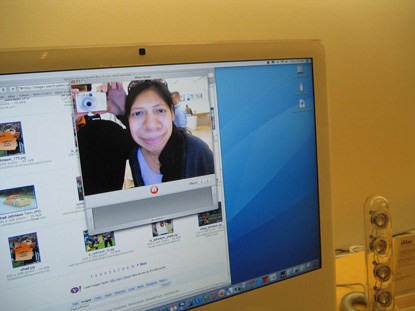
Hey look! It's the PinoyMacLovers website. Hooray! :)


And this is the Genius Bar where you can go to when you experience problems with your Mac (but you won't be having much of that, really ;) )


Oooh! iPods!


The oh-so-sexy (PRODUCT) REDTM.

The Apple Store on 5th Ave is definitely a place that people of all ages can enjoy. This is Baby Sofia having such a fun time playing with a Mac. Isn't she adorable?

PinoyMacLovers would like to thank the Dominguez family for sending in such lovely pictures. We do hope that you find a Mac that's right for you so you can finally make that switch. It would be a nice gift to yourselves for this joyous yuletide season. Happy Holidays! :)

Saturday, December 16, 2006

Win An iPod Nano In HSBC Philippines' Click And Play Promo

HSBC Philippines' Click and Play promo has been extended until 31 December 2006. Hurry while you still have a chance to win a 1GB iPod Nano in their monthly draw.

The following online transactions will bring you closer to an iPod Nano:
1. Telegraphic Transfer
2. Local Payments
3. Demand Drafts
4. Cashier's Order
5. Utility Payments
6. eStatement registration
7. online@hsbc registration

So what are you waiting for? The more transactions you perform online, the more chances of winning!

For more information please visit hsbc.com.ph.

Per DTI-NCR Permit No. 2724. Series of 2006

DISCLAIMER: PinoyMacLovers is not affiliated with HSBC.

Ynzal's Annual Inventory Sale 2006

Wow, it seems that Apple discount sales abound this holiday season! Wwweeeeee!!! :) Ynzal is once again having their inventory sale on December 18-20, 2006 from 9am to 5pm at its Sct. Rallos QC headquarters. Expect to find pre-owned as well as brand new Apple products at great, great prices!

Check out this link to see the list of items to be sold:
http://ynzal.com/news_sale2006.html
(to be uploaded on Saturday Dec. 16, 2006 at 6pm)

For details, you may call 413-7575/74 or 413-7578/79 or email inquiries to info [at] ynzal [dot] com

Disclaimer: PinoyMacLovers is not affiliated with Ynzal.

Monday, December 11, 2006

New Power Mac Center Store Opens In Greenbelt 3, Holds 3-Day Sale

The Power Mac Center, one of the leading authorized Apple resellers in the Philippines, recently opened its flagship store in Greenbelt 3. And to celebrate this success, they will be holding a special 3-day sale from Dec. 15-17, 2006 with discounts of up to 20% on all Apple items. And from Dec. 15-24, 2006, product purchases of Php 100,000 and more can be delivered to your doorstep for free (within Metro Manila only). So head on over to the Power Mac Center in Greenbelt 3 and make the switch this holiday season. It'll definitely be one of the nicest gifts you can get yourself. :)

The new Power Mac Center store is located on the 2nd Floor of Greenbelt 3 in Ayala Center, Makati.

Tuesday, December 05, 2006

Free Mac Apps!

MacAppADay is giving away free Mac apps! They are giving away 5,000 copies of a Mac application of their choice for each and every day of December. That's one new application everyday for the whole month of December that you can download for free! Christmas cheer indeed! So be sure to visit their site daily. You might just find that app that you've always wanted but were too stingy to pay for. :)

Thursday, November 30, 2006

iPod Vending Machine

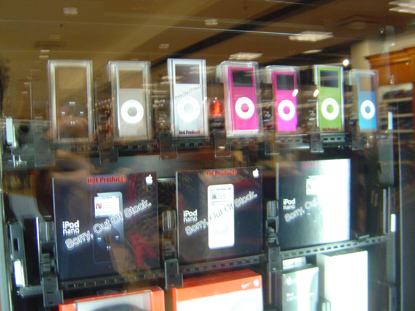
I was doing some window shopping at Macy's in Newport, Jersey City when I came across this interesting machine which I just had to take photos of - an iPod vending machine! Isnt that great? A vending machine that actually dispenses iPods. Coolness.

There's an easy-to-use touch panel located on the right side of the machine which lets you select the item that you'd like to purchase. After that, you simply swipe your card through the swiping thingy and you're done!

As you can see in this picture, some models are actually out of stock, which most likely means that quite a few people actually buy their iPods from this supercool vending machine.

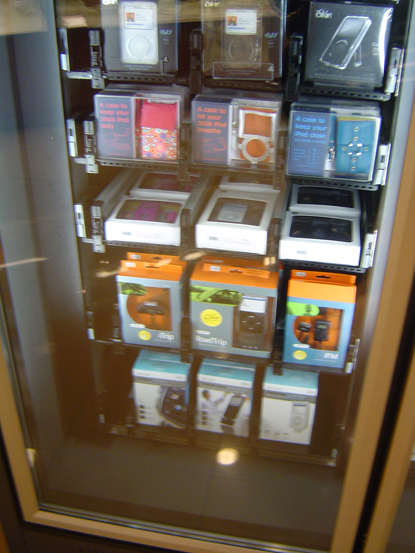
You can also get some great iPod accessories as you can see in this next photo.

When I saw this machine, I had to restrain myself from actually buying an iPod because I knew that my credit card was fast approaching its limit. So I simply marveled at it for a few hours until the security guard told me to leave because I was scaring the other customers.

Tuesday, November 28, 2006

I Was On Vacation...

Hello, people of the world. Lately, you may have noticed that I haven't been updating this blog very often. I was on vacation, you see (3 1/2 weeks in the US of A!). And I promised myself that during my vacation, I would refrain from using the internet as much as I could, thereby giving my wrists much needed rest and further delaying the onset of carpal tunnel syndrome. It was actually very liberating to go for days without opening a browser. Without a doubt, my internet abstinence contributed greatly to the overall pleasantness of my vacation. But now I am back. So expect some new entries in the coming days (that is if I get to shake myself out of this vacation-y mood that I'm still in).

Friday, November 10, 2006

BitTorrent Clients For Mac OS X

Mac users who are looking for a BitTorrent client have a few options available - the official BitTorrent client, Azureus, Tomato Torrent, and Bits on Wheels, to name a few. Among these, I've been able to use two - the official BitTorrent client and Azureus. Here are some of my opinions regarding these apps.

The Official BitTorrent Client
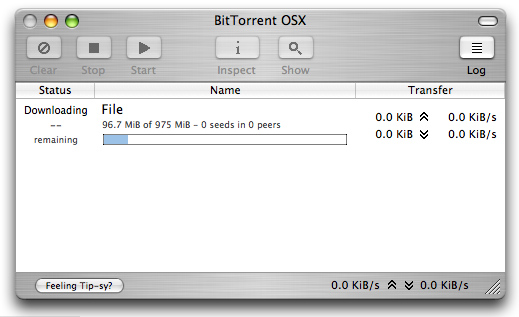
What I like about the official BitTorrent client is its easy to use interface. It has a very simple toolbar that contains the basic buttons you need to download torrents. It's a good option to choose if you're a beginner trying to figure out how torrents work. BitTorrent also sports the brushed steel look making the interface very OSeXy.

What I don't like about it is that I can't seem to get fast connections. Even when my bandwidth is freed up, my download speeds remain pretty slow. I also find myself having to constantly restart the application during long downloads because they simply stall after certain periods. I'm not exactly sure why, but this may be caused by the fact that I'm connected to the internet behind a router. I should be able to remedy this by tweaking some settings. The problem is that I don't know which settings to tweak because I'm still a beginner when it comes to using BitTorrent clients.

click to view larger image
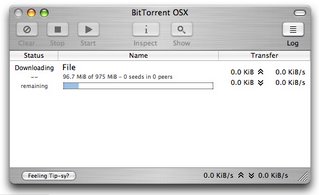
Get the official BitTorrent client.

Azureus
Azureus is a Java-based BitTorrent client, which means that it can run on any platform provided that you have the Java Runtime Environment
(which you can get for free at Java.com) installed. It has tons of features that might confuse the average user, but the program does allow you to choose between three user proficiency modes - beginner, intermediate and advanced - making it a client that's suitable for just about anyone. Compared to the official BitTorrent client, the connection speeds I get using Azureus are much faster. And I don't find myself having to restart the application over and over. I haven't really been able to play around with many of the features available, and most of them I don't even need because I'm not really an advanced user. But one of the features I do like is how Azureus allows you to easily set caps on the upload and download speeds of each individual torrent. I find this to be very useful when downloading multiple torrents as it gives you greater control in distributing the available bandwidth that you have.

The main disadvantage with Azureus is that it uses up more computer resources (maybe because it's packed with features) compared to the official BitTorrent client. But that shouldn't be much of a problem unless you're using a really slow computer.

click to view larger image
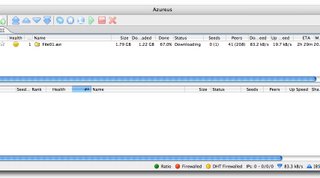
Get Azureus.

So...

The official BitTorrent client vs Azureus? Azureus.

I like the official BitTorrent client's interface and appearance better because it's very simple. But I still choose Azureus because it gives me faster connection speeds, which I think is a more important factor since the main point of using these programs is for you to be able share files with others.

Tuesday, October 31, 2006

A PinoyMacLover In Cincinnati

PinoyMacLover's reader, Diane, sent us some pictures of the Apple Store at the Kenwood Towne Centre in Cincinnati, OH. Check 'em out.

Oooh! So shiny...


Here's Diane playing with one of the iMacs on display.


Photo Booth! :D


Diane works as an IT professional, but she's also an aspiring musician. Here, you see her workin' it out on a Mac Pro set up with an electronic piano.

Thanks for the great photos, Diane! :)

Friday, October 27, 2006

MacBook Pro: New 17-inch Models And Now Powered By Intel Core Duo 2

For those of you waiting for a 17-inch MacBook Pro, wait no more for Apple has finally announced its arrival. Hoorah! Powered by the Intel Core Duo 2 processor, this sexy beast boasts of up to 39% faster speeds compared to the older 15-inch MacBook Pro (the new 15-inch model now comes with an Intel Core Duo 2 processor as well). Check it out at apple.com/macbookpro.
Sunday, October 22, 2006

Making Sure QuickTime Plays DV Files At High-Quality

Problem: I edited a home video using iMovie. I shot my footage using a miniDV camcorder, I captured the video in DV format, I edited using the DV setting and exported the project as a full quality DV file. But when I played the video using QuickTime, the video quality wasn't very good. How do I fix this?

If your video was shot, captured, edited and exported in DV format, then the final file should have good quality during playback. If the video quality of your DV file is poor when viewed using QuickTime, try this:

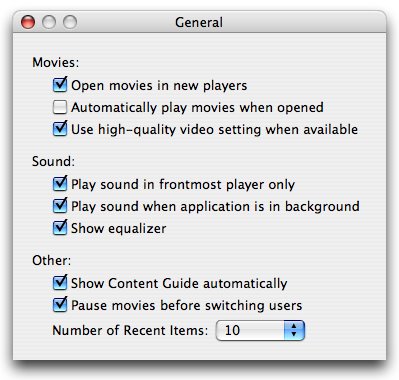
Open QuickTime Player and hit Command + , (comma) on your keyboard to launch QuickTime's "General Preferences" window. Under Movies, make sure that "Use high-quality video setting when available" is checked. Then open your DV file using QuickTime. This time, you should see good video quality.


DV files will take up a lot of space on your hard disk so you might want to use iDVD to convert your DV projects into DVD-Video. Doing so will also enable you to easily share your work with friends and family. So, what are you waiting for? Go get that tape from last year's Christmas party and start making your very own home video masterpiece! :-D

Saturday, September 30, 2006

Downloading Videos From YouTube And Playing FLV Files On Your Mac

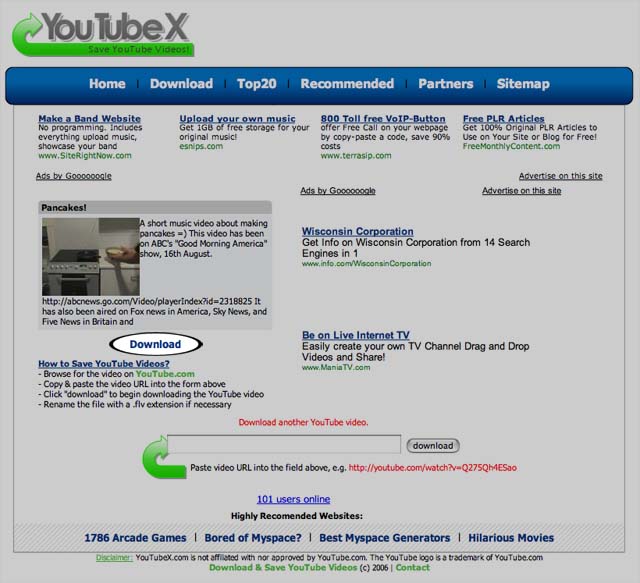
If you're a YouTube addict like I am, you've probably wondered if there was a way to save those videos onto your hard drive (yeah, because spending hours watching random videos about pancakes and grown men dressed in drag lip syncing to Cher's greatest hits CLEARLY isn't enough). Well, YouTube doesn't actually let you save videos from their website to your hard drive, but there are sites that can help you out. You can try Javi Moya's Video Downloader (this one also lets you download videos off of other sites like Google Video, Myspace, etc...). It's very easy, all you have to do is input the video page's URL in the text box provided, and a download link to the video will be generated for you.

Step 1: Input valid YouTube video URL

Step 2: Click on generated link to download video

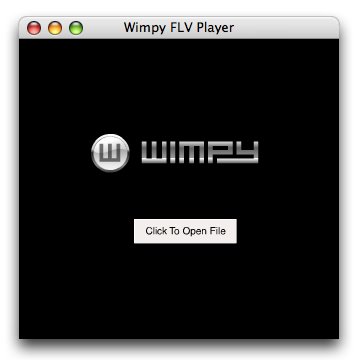
YouTube videos are in FLV format so you will need an FLV player to view them. You can get one from Wimpy. They have a free FLV player available for download at their website.
Enjoy the videos! :-D

[UPDATE: 06-February-2006]

You can also try the ff:

- FLVthing by Automagic Software is a standalone FLV player just like the one by Wimpy. It's freeware, too.

- Perian, on the other hand, is a free, open source QuickTime® component that adds native support for many popular video formats including FLV. So installing this will allow you to play FLV files using QuickTime®.

Win A Brand New iPod Video From Fully Booked

Calling all bookworms!

For every P1000 single receipt purchase at Fully Booked (at the Power Plant mall in Rockwell), you get the chance to win a 60GB iPod Video in their iRead... iWin! promo, which runs from September 22 to October 31, 2006. Check out fullybookedonline.com for the contest ad.

Tuesday, September 26, 2006

Mac OS X Tip Of The Day: Using Safari To Email Web Pages Through Mail.app

Have you ever come across a blog entry that got you so excited you just had to let everyone know about it? As in, like, right away? If you answered yes to that question... well, that kinda makes you a bit pathetic, doesn't it? I mean c'mon... surely you can find things in your life that are more exciting. Right?

Anyway...

Some blog entries have an "email this" button at the end of every post. Comes in very handy if you really just have to send that post you found with yet another picture of a drunken Tara Reid to all the people in your mailing list. But if that button is nowhere to be found, fear not, for Safari - Apple's supercool browser - is here to make your lives easier. Hoorah! :-D

Here's how it works: when you're browsing a web page using Safari, hitting Command+i on your keyboard will automatically open that web page in a new Mail.app message ready to be sent to anyone on your address book. It's so easy! This keyboard shortcut is also very handy if you'd like to send any HTML formatted emails using Mail.app. Just create your HTML page using TextEdit or any wsywig HTML editor, open it in Safari and press Command+i. Voila! But some people despise getting HTML formatted emails so be sure to go easy on the neon-colored fonts and animated butterfly gifs.

Wednesday, September 13, 2006

Apple Unveils An All-New iPod Lineup

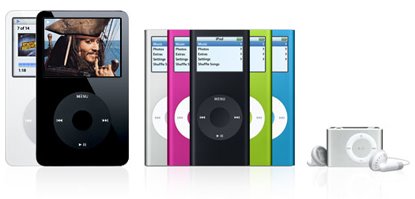
Apple has just recently unveiled new models for their entire iPod lineup. The iPod Shuffle has gotten even smaller and now comes with a built-in clip so you can conveniently attach it to your pocket, sleeve, waistband, etc... The iPod Video, aside from the 30GB model, now comes with 80GB of storage space which lets you store up to 20,000 songs. And finally, the iPod Nano has been completely remastered - thinner design, longer battery life and a brighter display. But it doesn't end there. Aside from being able to choose between the 2GB, 4GB and the new 8GB models, you can also pick from any of the five stunning colors it now comes in - silver, pink, green, blue and black. Yay! :)

Check out:
apple.com/ipod
iPod Nano TV Ad
 

Disclaimer

Information on this site may contain errors or inaccuracies. PinoyMacLovers is provided "as is" without warranty of any kind as to the correctness or reliability of the site's contents. PinoyMacLovers, and the author thereof, shall not be held responsible or liable, under any circumstances, for any damages resulting from the use or inability to use the information within. Furthermore, PinoyMacLovers is in no way responsible for or has control over the content of any external web site links.

PinoyMacLovers is an independent web site and has not been authorized, sponsored, or otherwise approved by Apple Inc.

Apple, Apple Logos, Macintosh, and Mac OS Logos are registered trademarks of Apple Inc. All other trademarks mentioned belong to their respective owners. If you own rights to any of the content seen here, and do not wish them to appear on this site, you may send an email to copyright [at] pinoymaclovers [dot] com, and they will promptly be removed.

Privacy Policy for PinoyMacLovers.com

The privacy of our visitors to PinoyMacLovers.com is important to us.

At PinoyMacLovers.com, we recognize that privacy of your personal information is important. Here is information on what types of personal information we receive and collect when you use and visit PinoyMacLovers.com, and how we safeguard your information. We never sell your personal information to third parties.

Log Files
As with most other websites, we collect and use the data contained in log files. The information in the log files include your IP (internet protocol) address, your ISP (internet service provider, such as AOL or Shaw Cable), the browser you used to visit our site (such as Internet Explorer or Firefox), the time you visited our site and which pages you visited throughout our site.

Cookies and Web Beacons
We do use cookies to store information, such as your personal preferences when you visit our site. This could include only showing you a popup once in your visit, or the ability to login to some of our features, such as forums.

We also use third party advertisements on PinoyMacLovers.com to support our site. Some of these advertisers may use technology such as cookies and web beacons when they advertise on our site, which will also send these advertisers (such as Google through the Google AdSense program) information including your IP address, your ISP , the browser you used to visit our site, and in some cases, whether you have Flash installed. This is generally used for geotargeting purposes (showing New York real estate ads to someone in New York, for example) or showing certain ads based on specific sites visited (such as showing cooking ads to someone who frequents cooking sites).

DoubleClick DART cookies
We also may use DART cookies for ad serving through Google’s DoubleClick, which places a cookie on your computer when you are browsing the web and visit a site using DoubleClick advertising (including some Google AdSense advertisements). This cookie is used to serve ads specific to you and your interests ("interest based targeting"). The ads served will be targeted based on your previous browsing history (For example, if you have been viewing sites about visiting Las Vegas, you may see Las Vegas hotel advertisements when viewing a non-related site, such as on a site about hockey). DART uses “non personally identifiable information". It does NOT track personal information about you, such as your name, email address, physical address, telephone number, social security numbers, bank account numbers or credit card numbers. You can opt-out of this ad serving on all sites using this advertising by visiting http://www.doubleclick.com/privacy/dart_adserving.aspx

You can choose to disable or selectively turn off our cookies or third-party cookies in your browser settings, or by managing preferences in programs such as Norton Internet Security. However, this can affect how you are able to interact with our site as well as other websites. This could include the inability to login to services or programs, such as logging into forums or accounts.

Deleting cookies does not mean you are permanently opted out of any advertising program. Unless you have settings that disallow cookies, the next time you visit a site running the advertisements, a new cookie will be added.

AdSense Privacy Policy Provided by JenSense